
Views: 0 Author: Site Editor Publish Time: 2026-08-08 Origin: Site


The persistent disconnect between rigid ergonomic standards and natural human instinct becomes obvious during long hours of deep work. People naturally want to shift, tuck, and fold their legs. They seek the physical freedom of meditation-style seating right at a professional desk. Attempting an office chair cross legged position in standard seating often results in bruised ankles, restricted circulation, and compromised spinal alignment. Restrictive, narrow seat pans and fixed armrests actively fight against your body. We need an evidence-based framework to evaluate seating options. You can safely accommodate alternative postures without sacrificing foundational ergonomic support. Protecting long-term musculoskeletal health requires understanding the mechanical limits of your current setup and identifying specific hardware features that support dynamic movement.
Maintaining a traditional 90-90-90 seating posture over an 8-to-10-hour workday introduces severe physiological limitations. Muscular fatigue builds up when you hold static positions. Your body signals discomfort to force movement. Standard guidelines ignore the reality of human behavior during intense focus. Sitting perfectly upright with feet flat on the floor works well for short intervals. However, the human body resists static loading. Blood pools in the lower extremities. Lumbar discs compress under the constant vertical gravitational pull. The muscles supporting the spine eventually tire, leading to the inevitable slump.
Psychological and physical drivers push us to tuck our legs. Shifting weight distribution provides immediate relief. Seeking a grounded posture helps anchor concentration. Naturally reducing lower back fatigue requires changing the angle of your pelvis, which crossing your legs accomplishes instantly. When you pull your legs up, you alter your center of gravity. This shift forces the core muscles to engage differently, temporarily relieving the specific muscle groups that have been working to keep you upright. It is a natural coping mechanism for prolonged sedentary work.
Biomechanical benefits exist when you modify your posture. You achieve a slight forward pelvic tilt. This mimics the posture-correcting effects of a kneeling chair. It provides temporary relief of lumbar tension by shifting the load away from the lower spinal discs. Opening up the hip angle can also stretch tight hip flexors, which notoriously shorten and stiffen during standard seated work. For many, this position feels inherently more stable and grounded, reducing the subconscious effort required to balance the upper body.
However, documented clinical risks require attention. Asymmetrical pelvic alignment occurs if you favor one leg. Restricted lower-extremity blood flow happens when edges press into your calves. Peroneal nerve compression leads to numbness. Excessive lateral torque places dangerous stress on knee and hip joints over time. If your chair lacks the proper width, your knees will press against hard armrest supports. This creates localized pressure points that can cause deep tissue bruising. Furthermore, sitting without proper back support in this position forces the spine into a C-curve, accelerating disc degeneration.
Dynamic movement remains a necessity. Alternating positions regularly is the only way to enjoy the comfort of cross-legged sitting safely. You protect orthopedic health by refusing to stay locked in any single posture for hours. The goal is not to replace flat-footed sitting entirely. Instead, you want to integrate alternative postures into a broader rotation strategy. This keeps joints lubricated, maintains healthy circulation, and distributes physical stress across different muscle groups throughout the day.
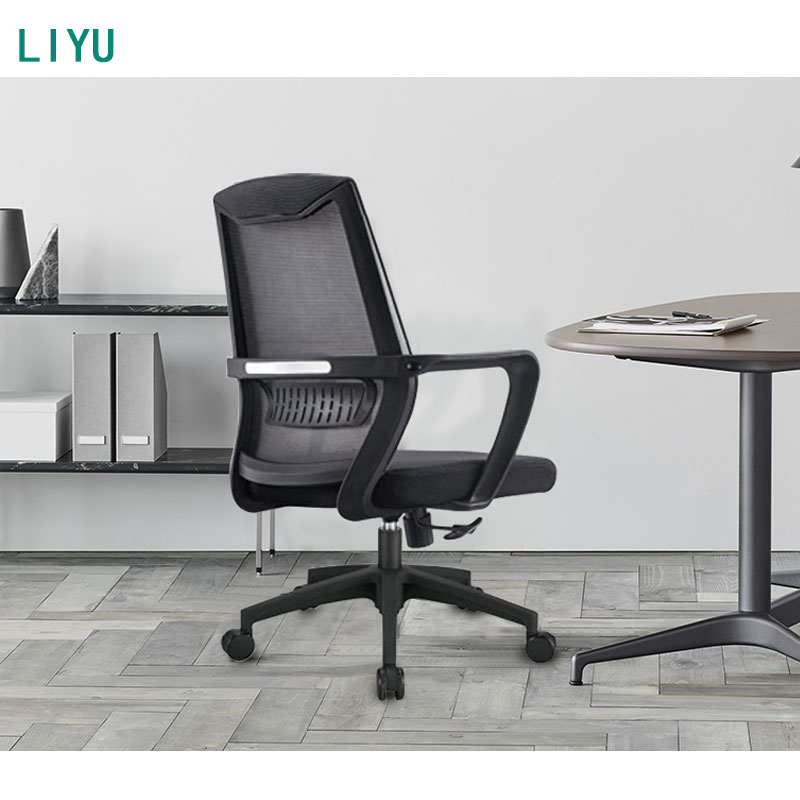
Heavily contoured, bucket-style seat pans actively penalize leg tucking. Aggressive waterfall edges compress the outer thighs when you fold your legs inward. These designs force your body back into a forward-facing position, ruining office chair seat comfort for alternative postures. A seat pan designed for racing or strict forward-facing tasks features raised side bolsters. These bolsters dig directly into your ankles and calves when you attempt to cross your legs. The physical boundary dictates your posture.
You need specific minimum requirements to accommodate adult knees and ankles without edge-pressure. A wide, flat surface prevents bruising. Adequate depth ensures your feet do not hang off the front edge. High weight capacity guarantees the mechanism handles concentrated loads when your weight shifts entirely onto the seat pan. Look for a seat width of at least 20 to 22 inches. The surface should be relatively flat, allowing your sit bones to rest evenly regardless of how your legs are positioned. The front edge should have a gentle curve, but not a steep drop-off that cuts into your ankles.
Fixed or narrowly spaced armrests create physical barriers. They force awkward, asymmetrical leg crossing. They pinch the lower legs and restrict knee splay. You cannot achieve a balanced meditation posture if plastic supports dig into your thighs. Many standard chairs feature armrests that bolt directly to the sides of the seat pan. This design severely limits lateral space. When you pull your knees up and out, they immediately collide with the armrest posts.
Evaluating armrest configurations is critical for lateral clearance. Look for 3D or 4D armrests that push outward. Flip-up mechanisms offer immediate space. Completely armless configurations provide maximum freedom, though they sacrifice elbow support during typing tasks. If you must have armrests, ensure they have a wide width adjustment range. Some high-end models allow the armrest pads to slide backward, clearing the front half of the seat pan entirely. This provides the necessary room for your knees while still offering support when you return to a standard typing posture.
Mesh frames introduce a problematic "trampoline effect." The hard plastic or metal perimeters required to suspend the material in an adjustable mesh office chair cause severe ankle and foot discomfort. When you cross your legs, your ankle bones press directly into these rigid boundaries. Mesh relies on high tension to support your body weight. This tension is anchored to a solid frame. While mesh excels at breathability and distributing weight for flat-footed sitting, it fails completely when subjected to the concentrated, bony pressure points of crossed ankles.
Thick, high-density molded foam generally outperforms standard mesh for this specific use case. Specialized fabric suspensions also work well. Foam allows for even pressure distribution across folded legs. It eliminates the hard contact points that cause bruising and numbness. When evaluating foam, look for high-density molded polyurethane. It resists bottoming out under concentrated loads. A minimum of three inches of high-density foam provides the necessary buffer between your ankle bones and the hard plastic or plywood base of the seat pan.
Test the Seat Depth vs. Thigh Length ratio. Ensure you have enough clearance to pull your feet up onto the seat pan. Your knees must not hit the underside of your desk. Measure the distance between the seat surface and the desk frame. You need at least 8 to 10 inches of vertical clearance between the top of your thighs and the bottom of the desk surface to comfortably cross your legs without scraping your knees.
Perform the Armrest Swing-Back Test. Verify if armrests push back, slide out, or lower enough to clear knee height. Active leg crossing requires unobstructed space on both sides of your hips. If the armrests cannot be moved out of the way, the chair fails the test for alternative postures.
An ergonomic desk chair offers uncompromised lumbar support and high build durability. They feature synchronized tilt mechanisms and comply strictly with occupational health standards. However, they often utilize highly structured, restrictive seat pans. Their rigid frames strictly enforce forward-facing, flat-footed postures. These chairs are engineered for a very specific, idealized version of sitting. They excel at supporting the spine during intense, forward-leaning task work. But their highly contoured surfaces actively reject any deviation from the standard 90-90-90 posture.
These models feature extra-wide, armless designs built specifically for maximum legroom. They cater entirely to alternative sitting styles. Unfortunately, they carry a high risk of poor spinal alignment. These chairs frequently lack seat height adjustments, tilt tension controls, and the lumbar support required for safe, long-duration computer work. They are essentially padded stools with minimal backrests. While they offer the physical space to cross your legs, they abandon the core principles of ergonomic support. Using them for an 8-hour shift often leads to severe upper back and neck pain.
Chairs designed for "active sitting" bridge the gap. flexible task seating features wider bases and synchronized tilt mechanisms. Forgiving seat edges support multiple postures safely. You retain core ergonomic integrity while gaining the physical space to move. These chairs utilize flat, wide seat pans with high-density foam. They incorporate highly adjustable armrests that can be moved entirely out of the way. They offer the necessary lumbar support and tilt mechanisms to protect your spine, while still accommodating the natural human desire to shift and change positions.
| Chair Category | Seat Pan Design | Lumbar Support | Armrest Flexibility | Cross-Legged Suitability |
|---|---|---|---|---|
| Traditional Ergonomic | Contoured, restrictive | Excellent | Limited lateral movement | Poor to Moderate |
| Criss-Cross Specialty | Wide, flat, armless | Poor to None | N/A (Armless) | Excellent |
| Hybrid Flexible Task | Flat, forgiving edges | Good to Excellent | High (3D/4D or Flip-up) | Good to Excellent |
Mitigate circulation and nerve compression risks by limiting cross-legged intervals. Keep these sessions to 20–30 minute blocks. Do not let your legs fall asleep. Prolonged compression of the peroneal nerve, located near the outside of the knee, can cause temporary numbness or even long-term damage. You must actively manage your time spent in any single position.
Structure your transitions carefully. Move between flat-footed, cross-legged, and standing positions. This maintains joint lubrication and steady blood flow throughout the lower extremities. When you uncross your legs, extend them fully for a few moments before placing your feet flat on the floor. This allows blood to flow back into the calves and feet, preventing the pins-and-needles sensation.
Integrate the 90/10 standing desk rule. Alternate between active sitting for 90% of your desk session and standing for 10%. This relieves concentrated lower-extremity pressure and resets your spinal alignment. Standing up completely removes the pressure from your sit bones and allows your hip flexors to stretch out fully.
Pair flexible task seating with height-adjustable desks. You must maintain proper monitor eye-level and keyboard ergonomics regardless of how your lower body sits. Changing your leg position often changes your seated height slightly. When you cross your legs, your torso may sit slightly higher or lower depending on the compression of the seat cushion. A height-adjustable desk allows you to make micro-adjustments to keep your wrists neutral and your eyes level with the top third of your monitor.
Utilize adjustable footrests or under-desk foot stools. These act as an intermediary step. They relieve leg tension without forcing you to commit to a fully crossed-leg position on the seat pan. Elevating your feet on a stool can provide a similar shift in pelvic tilt and weight distribution, offering relief without the associated risks of nerve compression or ankle bruising.
A: It is not inherently bad for short durations. It can provide temporary lumbar relief and shift pelvic tilt. However, prolonged sitting in this posture causes asymmetrical spinal loading and restricts blood flow, making frequent movement essential.
A: Look for a wide, flat seat pan without aggressive contouring. High-density foam padding prevents pressure points. Highly adjustable, 3D/4D, or flip-up armrests are necessary to provide lateral clearance for your knees.
A: It is generally difficult. The hard plastic or metal perimeter frames required to tension the mesh dig into your ankles and feet, causing severe discomfort and bruising when your legs are folded.
A: A seat pan should ideally be at least 20 to 22 inches wide. This provides enough surface area to support adult knees and feet without pushing them against hard edges or armrest posts.
A: Usually, no. Most dedicated criss-cross chairs prioritize legroom over spinal health. They lack the adjustable lumbar support, tilt mechanisms, and structured backrests required for safe, long-duration computer work.
A: It provides immediate muscular relief but quickly leads to joint fatigue and nerve compression if held too long. Comfort degrades rapidly after 30 minutes, requiring you to shift back to a flat-footed posture.


