
Views: 0 Author: Site Editor Publish Time: 2026-02-05 Origin: Site


When shopping for the best ergonomic chair, getting the right one is non-negotiable. Going beyond aesthetics is crucial, as not every chair labeled ‘ergonomic’ has all the features for it to be truly ergonomic. But with so many options out there, how can you find a suitable ergonomic office chair that is right for you?
Welcome to our ultimate shopping guide, where we will tell you everything you need to know to pick the perfect office chair for your employees.
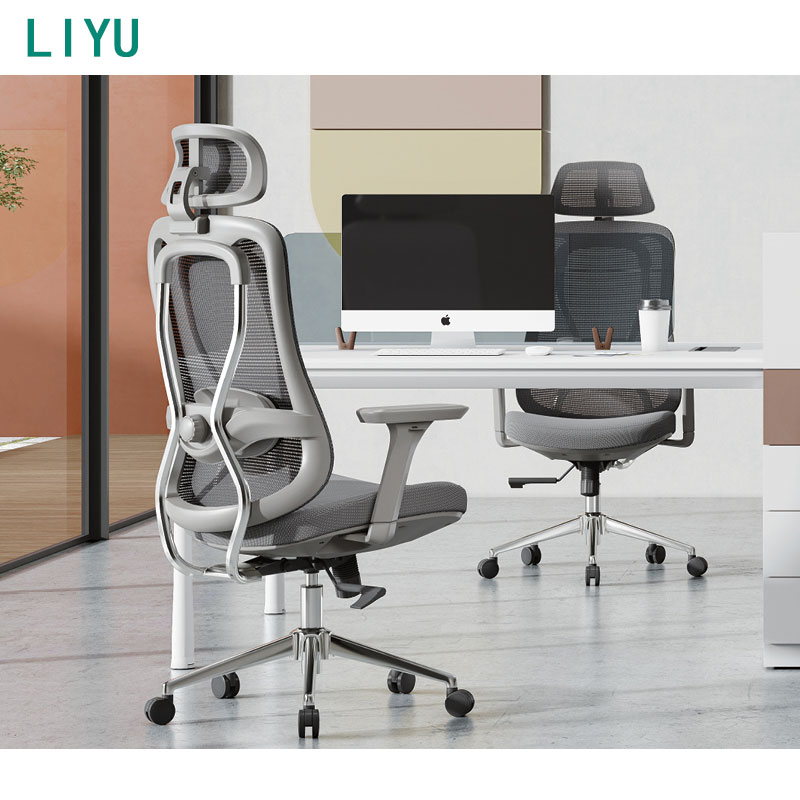
According to a report by the Occupational Safety and Health Administration, workplace ergonomics matters for boosting employees’ productivity and safety. Here are some key benefits of ergonomics in the workplace:
Health benefits: Ergonomics provides health benefits for employees. For example, it improves their cardiovascular system and circulatory system, reducing tension caused by poor posture and overexertion.
Reduces injury and pain: Employees are expected to work up to 40 hours per week in demanding situations. Poor posture can lead to injuries and pain, sometimes throughout one's lifetime. Ergonomics helps to reduce injury and pain, minimizing stress and strain.
Increase productivity: Ergonomics helps employees stay focused, engaged, and alert by reducing physical and mental discomfort. Employees who are comfortable can concentrate for longer periods without taking frequent breaks.
Cost saving: As an employer, getting an ergonomic chair lowers workers’ compensation costs and other expenses related to injuries and illness. Reductions in sick leave can also contribute to significant cost savings.
Improve employee satisfaction: Getting a comfortable chair leads to a more comfortable and safer workspace, which in turn boosts job satisfaction.
Support diversity: Ergonomics in the workplace helps to accommodate individuals with different physical abilities and needs.
The ability to adjust seat height is one to consider when looking for an ergonomic office chair. Every employee has a different body type and height, so customization ensures proper alignment between the chair, desk, and the user.
To optimize flexibility, select a height range that includes heights both slightly lower and slightly higher than your ideal setting. The seat should allow feet to rest flat on the floor with knees bent at about 900 angle.
Seated heights from 15” to 22” will accommodate users from 5’0’’ tall to 6’4’’ tall. An adjustment lever provides smooth height adjustment to prevent discomfort during long hours of sitting and support overall posture.
The seat pan should be wide enough to accommodate a range of body shapes. It should also be deep enough to support most of your upper leg, but not so deep that it contacts the back of your knees when you sit back in your chair.
The width of the seat should be between 17 and 20 inches, or at least 1 inch wider than your hips. But, it should not be so wide that you cannot rest your arms on the armrests without stretching them out to the side.
Therefore, when selecting a suitable ergonomic office chair, ensure it has an adequate seat pan without sacrificing comfort.
The seat pan should be positioned so that it allows for two or four fingers to fit between the back of your knee and the front of the seat. A proper seat depth allows the user to sit back so that he or she can position the curve of the seat to meet their curves when sitting back and using the lumbar curve of the chair back.
To adjust the seat pan depth, you can use a seat slider to slide the seat in and out while seated in the chair. You can also use a back depth adjuster to move the back in and out rather than the seat. However, this is suited for a one-user chair and may require assistance to adjust
A good office chair must have lumbar support to support the natural curve of your lower spine. It should have vertical and depth adjustment to reduce back pain, prevent slouching, and encourage a healthy posture. This is helpful if the employee has a lower back issue or if multiple people will be using the chair.
Chairs with dynamic lumbar systems adapt automatically to movements, providing consistent comfort. Poor lumbar support leads to back pain, fatigue, and strain, so looking out for this feature can improve health and productivity.
The reclining and tilt tension control chair will enable the employees to lean backward a bit to relieve pressure on the spine. This assists in dynamic sitting and enhances blood flow. An appropriate ergonomic office chair must enable the user to lock the backrest in order to be flexible, and tilt resistance must be adjusted based on body weight.
This personalization removes lumbar strain and promotes mini movements, which is important in avoiding fatigue and stiffness when working long hours.
The armrests should be height-adjustable. At the lowest point, they should be below the thigh height so that they don’t interfere with elbow movement when they aren’t needed. Here, it is recommended that the ideal adjusted height should be from 7.1 to 10.6 inches above the compressed seat height.
A swing-back arm allows the user to move it out of the way when it’s not needed. A pivoting arm allows some users to position the arms for better support while typing. This helps to reduce shoulder, neck, and upper back tension.
When looking for a suitable ergonomic office chair, look for high-density foam or molded memory foam that maintains its shape after long use, while still providing firm and supportive cushioning.
Breathable upholstery fabrics, such as mesh chairs, are lightweight and ideal for hot climates. They are suitable for people who spend all day at their desk. Leather chairs are also stylish and luxurious, but less breathable. They are suitable for those who do not sit for long hours.
An ergonomic office chair must provide employees with the opportunity to move freely in the workspace with little effort. A 3600 swivel base also makes sure that the employees can access the various parts of the desk without any problems. Casters with high quality also enable easy rolling on different floors.
These mobility features are able to offer dynamic sitting, flexibility, and enhanced workflow. They also reduce the weight on the lower back and hips from repetitive stretching or twisting.
A headrest is crucial for employees who spend long hours at their desks, providing support for the head and reducing the weight on the neck. For employees who have neck issues, shopping for an ergonomic office chair with a headrest is a must.
Adjustable headrests allow employees to align support with their height and preferred posture, minimizing neck strain and supporting the upper spine. This is valuable for those who usually have tension headaches. Though it is optional, it adds an extra layer of comfort throughout the workday.
The backrest of the chair should have an adjustable height to allow the lumbar curve of the chair’s backrest to fit into your lower back. An adjustable lumbar support ensures the chair fits different body sizes and promotes better posture. The backrest should support the entire back - from the lower lumbar region to the shoulder blades, without restricting movement.
Chairs with adjustable backrests prevent discomfort caused by improper spinal support and reduce long-term strain.
Back angle adjustment helps fit the chair to the user's body type. Reclining in the chair supports the weight of the upper body and relieves pressure from the lower back. Many chairs have a locking back angle adjustment to provide a comfortable reclining or upright position and then lock that position.
This feature provides comfort during reading, calling, video conferencing, or relaxation breaks. It is useful for employees who switch tasks frequently throughout the day. With this feature, employees can relieve spinal stress and improve overall ergonomic well-being.
This feature controls the amount of resistance felt when reclining. It allows employees to customize how easily the chairs lean back, depending on their body weight. A properly adjusted tilt tension provides support, preventing the backrest from reclining too easily or being too stiff.
This feature used in ergonomic chairs helps in active sitting, promotes frequent change in posture which helps in enhancing circulation and comfort. Most importantly, it promotes the wellness of workspaces during the day.
For Office Staff: Office personnel should have normal ergonomic mesh chairs in terms of breathable comfort and good lumbar support. The mesh cloth allows for the flow of air, which keeps employees cool when working extended hours. Tilt, adjustable heights, and armrests are all used to make sure that you sit in a correct posture, minimize fatigue, and enhance workflow.
For Executives: Executives require high-quality and luxurious office chairs that are comfortable and ergonomic. The cushioning is also good to help add comfort and make it look professional to maintain posture when in a long meeting.
Designers and Creatives: These workers require chairs that have flexible backrests, tilt, and move fluidly. Such designs promote natural body movement in protracted design sessions.
Remote employees: Remote employees require ergonomic office chairs that can fit in home office setups. Such chairs ought to be height-adjustable, back-supported, and breathable to provide comfort and space-saving.
Overlooking seat depth and lumbar adjustment: This will lead to awkward posture and pain in the back. When selecting office seats, select seats with customizable lumbar positioning and seat pan depth in order to be comfortable.
Choosing appearance over comfort: Another error is to select chairs by considering their appearance or design only. Comfort features should take precedence over aesthetics.
Buying one-size-fits-all models: Another office chair mistake is buying one-size-fits-all chair models. It is important to remember that users are of various body types, such as height, weight, and form. Choose those chairs that can be adjusted to suit various body sizes to sit upright and comfortably.
Ignoring durability: Overlooking durability is another mistake to avoid. Choose chairs that are of good-quality materials and have a firm base for long-term comfort.
Not all chairs are designed equally. Choosing a suitable ergonomic office chair for your employees means balancing comfort, budget, and aesthetics. But in the long run, it is the best decision you can make for your business.
Foshan Liyu Furniture Co., Ltd. has premium office seating solutions tailored to your needs. Contact us now for high-quality designs.
Ergonomic standards for office chairs feature adjustability and support to promote good posture and comfort. They also have adjustable seat height, depth, and backrest angle with adequate cushioning. Furthermore, they feature lumbar support to maintain the spine’s natural curve.
The best specifications for an office chair include seat height adjustability of about 16 to 21 inches. Other specifications include seat depth, armrest height, and backrest angle for a personalized fit.
A chair is ergonomic if it features adjustments for seat height, backrest angle, armrest height, and lumbar support to support the lower back. The seat should also have adjustable depth and tilt with breathable material for comfort.
Yes, it is best if your feet touch the ground when sitting in a chair, ideally flat on the floor with your knees at a 900 angle. If you sit on a chair and your feet don’t touch the floor, use a footrest to support them to maintain proper posture.
A firm chair is better for posture as it provides comfort for the spine and allows for even pressure distribution. Soft chairs may be comfortable for a while, but in the long run, they may cause you to slouch and strain your muscles. Choose a chair that provides firm support and ergonomic comfort for your body.


