
Views: 0 Author: Site Editor Publish Time: 2026-05-27 Origin: Site


Have you ever tried to turn a simple corner in your home into a productive workspace, only to realize that once you add two or three monitors, everything suddenly feels crowded, unstable, and visually overwhelming, and have you also noticed that some setups look like professional trading stations while others feel improvised and constantly shifting out of alignment even when using similar equipment? The difference rarely comes from the monitors themselves but instead comes from the foundation they sit on, especially the home office desk that silently determines stability, ergonomics, and overall workflow efficiency.
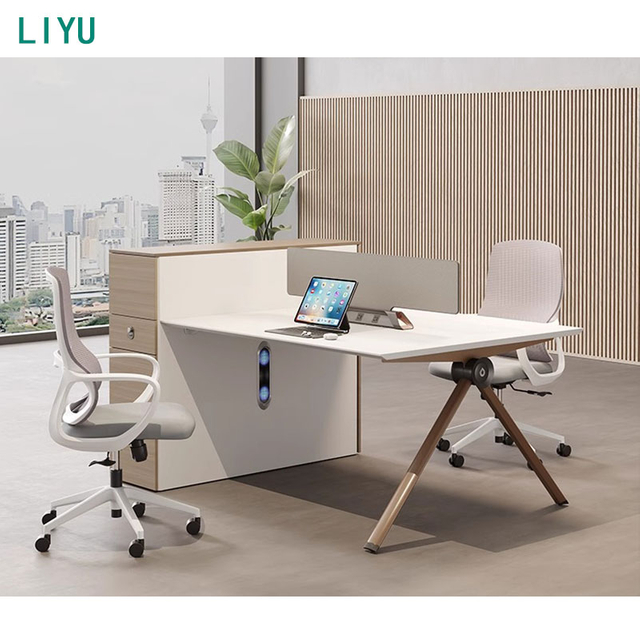
In today’s digital working environment, where remote jobs, content creation, programming, and financial trading all rely heavily on multi-screen systems, the demand for a properly engineered workspace has increased significantly. A poorly chosen desk can lead to neck strain, cable chaos, limited productivity, and even long-term equipment instability, while a properly designed solution transforms the entire working experience into something smooth, efficient, and professional.
In this article, you will learn how to choose the ideal home office desk for multiple monitors working setups, what structural features matter most, how different desk types compare in real usage scenarios, and how material selection, ergonomics, and layout planning all influence long-term productivity and comfort.
A multi-monitor environment places completely different demands on a workspace compared to a traditional single-screen setup, because instead of handling minimal weight and limited surface usage, the system must now support multiple displays, adjustable arms, docking stations, and often additional devices such as speakers, lighting systems, and laptops, all of which significantly increase both weight and spatial requirements.
A standard home office desk is often designed with basic tasks in mind, such as writing or laptop use, meaning it typically lacks reinforced structure, deep surface area, and vibration resistance, which becomes a serious limitation when multiple monitors are installed. Even slight movement in the desk structure can create visible screen shaking, which negatively affects focus and comfort during long working hours.
Another important factor is cable management complexity, because multi-monitor setups generate significantly more wiring, and without a properly designed home office desk, cables can quickly become tangled, visually distracting, and difficult to maintain, reducing both workspace efficiency and aesthetic quality.
To support modern digital workflows effectively, a home office desk must meet several structural and ergonomic requirements that directly influence performance, comfort, and long-term usability in multi-monitor environments.
Requirement Category | Description | Importance Level | Impact on Workflow |
Surface area | Sufficient width and depth for multiple screens | Very High | Prevents overcrowding |
Load-bearing strength | Ability to support monitors and arms safely | Very High | Ensures stability |
Structural reinforcement | Metal or hardwood support frames | High | Reduces vibration |
Cable management system | Built-in routing channels and trays | High | Improves organization |
Ergonomic height design | Supports posture alignment | Very High | Reduces fatigue |
Each of these factors plays a critical role in determining whether a home office desk can truly support long-term multi-monitor use without compromising comfort or stability, especially in professional environments where users spend many hours per day at their workstation.
Material selection is one of the most important decisions when choosing a home office desk for multiple monitors because different materials vary significantly in strength, durability, and vibration resistance, all of which directly affect long-term performance.
Solid wood is often considered the most stable option because of its natural density and structural integrity, making it ideal for users who prioritize durability and long-term investment value. Metal frame desks, on the other hand, provide industrial-level strength and are particularly suitable for high-performance setups where heavy monitor arms and multiple devices are used.
Engineered wood offers a more affordable alternative, but it typically has lower load-bearing capacity and may require additional reinforcement when used in heavy multi-monitor environments.
Different desk designs serve different working styles, and choosing the right structure can significantly improve productivity and comfort when using multiple monitors.
Desk Type | Stability | Monitor Capacity | Space Efficiency | Best Use Case |
Rectangular desk | Medium | Medium | High | Basic office work |
L-shaped desk | High | High | Medium | Multitasking workflows |
Standing desk | Medium | Medium | High | Ergonomic flexibility |
Custom workstation | Very High | Very High | Medium | Professional trading/design setups |
This comparison shows that while a rectangular home office desk may be sufficient for light multi-monitor use, more advanced workflows typically require L-shaped or custom workstation designs that offer greater surface area and structural stability.
The ideal home office desk is not universal, as different professions place different demands on multi-monitor configurations, which means user behavior must be considered when selecting a workstation.
Content creators and video editors often require wide surface areas to accommodate editing tools and preview screens simultaneously, while programmers prioritize stability and cable organization due to long coding sessions. Financial traders typically require ultra-stable, high-capacity desks that can support multiple real-time data screens, while general remote workers usually prioritize a balance between aesthetics, comfort, and compact design.
Ergonomics plays a crucial role in ensuring that a home office desk supports long-term health and productivity, especially in multi-monitor environments where improper alignment can lead to neck strain, eye fatigue, and posture-related discomfort.
Monitors should be positioned at eye level with consistent viewing distance across all screens, while the keyboard and mouse should remain within natural arm reach to avoid shoulder tension. The desk height must support a neutral sitting posture, allowing users to maintain comfort even during extended working sessions.
Ergonomic Factor | Recommended Standard | Purpose |
Monitor height | Eye level alignment | Reduces neck strain |
Viewing distance | 50–80 cm | Reduces eye fatigue |
Desk height | 70–75 cm (standard) | Maintains posture |
Arm positioning | 90-degree angle | Prevents shoulder stress |
Chair compatibility | Adjustable support | Enhances comfort |
A properly configured home office desk combined with correct ergonomic adjustments significantly improves productivity while reducing physical strain during long working hours.
Cable management is often underestimated but becomes critically important in multi-monitor setups because unmanaged cables can create visual clutter, reduce focus, and make maintenance more difficult over time. A well-designed home office desk should include integrated cable routing systems such as hidden trays, grommet holes, or under-desk channels that allow users to maintain a clean and organized workspace.
A clean workspace not only improves visual aesthetics but also enhances cognitive clarity, allowing users to focus better on tasks without distraction from physical clutter.
The performance of a home office desk depends heavily on manufacturing quality, especially when it is used in multi-monitor environments where structural stress is significantly higher than in standard office use. High-quality desks undergo load testing to ensure they can safely support multiple screens, monitor arms, and additional devices without deformation or instability.
Precision engineering ensures that joints remain stable over time, while surface treatments improve scratch resistance and durability. Reinforced frames, especially those made from metal or hardwood, are essential for preventing long-term structural fatigue.
A professionally manufactured home office desk is designed with long-term usage in mind, meaning it prioritizes stability, ergonomics, and durability over cost-cutting materials or simplified structures. These desks often include modular customization options, allowing users to adapt the workspace based on evolving multi-monitor requirements.
In contrast, low-cost desks may initially appear suitable but often fail under prolonged multi-monitor use due to insufficient reinforcement and poor structural design, leading to wobbling, surface damage, or reduced lifespan.
Modern workspace trends are significantly influencing home office desk development, particularly in response to remote work growth and digital lifestyle expansion. One major trend is the rise of hybrid workstations that combine sitting and standing functionality, allowing users to switch positions throughout the day for improved health and productivity.
Another trend is modular workspace design, where desks can be expanded or reconfigured based on changing monitor setups or workflow needs. Sustainability is also becoming a key factor, with many users preferring eco-friendly materials and responsible manufacturing processes.
Choosing the ideal home office desk for multiple monitors working setups is a crucial decision that directly impacts productivity, comfort, and long-term workspace efficiency. A well-designed desk provides stability, ergonomic support, and sufficient space to handle complex multi-screen workflows, while also improving organization and reducing physical strain.
Whether used for programming, trading, content creation, or general remote work, the right home office desk becomes the foundation of an efficient digital workspace, transforming a simple setup into a professional-grade working environment that supports long-term performance and comfort.
A wide home office desk with at least 120–180 cm width is generally recommended depending on the number of monitors and additional workspace needs.
Some standard desks can support dual monitors, but a reinforced home office desk is recommended for stability and long-term durability.
Solid wood and metal frame home office desk designs provide the best stability and load capacity for multiple monitors.
Yes, an L-shaped home office desk offers more surface area and better workflow separation for multi-monitor setups.
Choosing a reinforced home office desk with strong structural support and proper weight distribution is key to preventing shaking.


