Views: 0 Author: Site Editor Publish Time: 2026-11-03 Origin: Site


The honest answer: the two names promise less than they seem to. The practical difference between computer desk and office desk categories is the workload each is bought for. A computer desk assumes one person, one screen or a laptop, and a compact footprint. An office desk assumes documents, storage within reach, space for a visitor and a longer service life in a commercial setting. Neither name guarantees a size, a cable hole or a durability grade, because those are configuration decisions made per model. So compare the way the task demands: write the equipment list, measure the footprint it needs, and check the named details. The label is a filter; the configuration is the decision.
This guide turns that principle into five checks a commercial buyer can run: what each name actually promises, the footprint your equipment and files occupy, how storage and expansion differ, where a single desk ends and a team configuration begins, and the checklist that turns the category argument into a line-item comparison. It is written for distributors, designers, construction companies and purchasing teams who have to translate category names into SKUs and quotations that hold up.

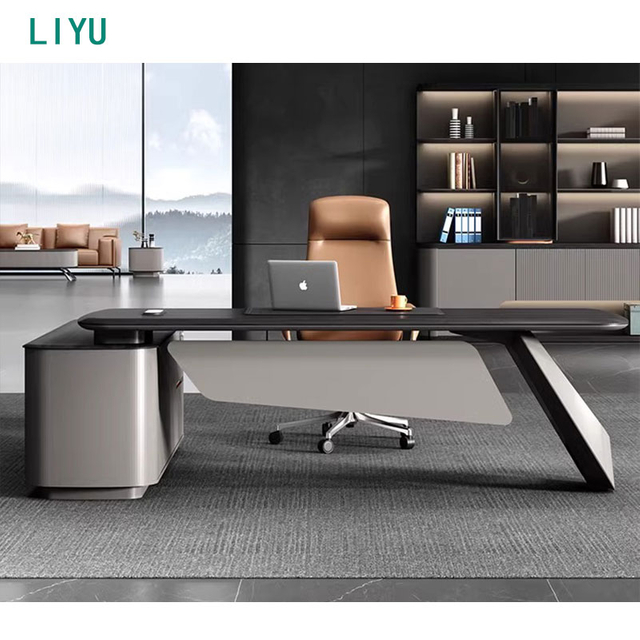
Same finish family, two different workloads: a compact single-screen desk and a full office desk with documents, storage and visitor space.
A computer desk grew out of personal computing: a compact top sized for a monitor and a keyboard, sometimes a tower shelf, usually little or no storage. An office desk grew out of the commercial contract: a surface that holds paperwork as well as equipment, storage within reach, room for a visitor on the other side, and, at the upper end, the finishes expected in a managed building. Both origins still show in the furniture, which is why the comparison feels confusing: the labels describe the workload they were invented for, not the dimensions they ship with.
The drift happened because work changed. Computers sit on every office desk now, and paperwork piles up on computer desks; marketplaces label freely, and the same word covers tops from about a metre to well over two. One reliable rule survives from the original split, and it is about equipment: one or more monitors need ample workspace, while a laptop can genuinely suffice on a compact top. Beyond that rule, treat the name as a search filter and never as a specification.
The trade-off: buyers who specify by label inherit the marketplace's ambiguity; buyers who specify by equipment list get comparable quotations from any supplier, whatever the product is called.
The comparison starts with a per-position inventory: how many screens, tower or laptop, printer or scanner, the paper volume, the handset, the personal kit. Then the arithmetic. A single screen and a laptop live comfortably on a compact depth; dual monitors plus document trays push both width and depth, because depth is what keeps a screen at a working distance and leaves knee room under the top. This is where the two categories genuinely diverge in practice: office desks tend to offer more depth and more surface behind the glass line, and that depth is what absorbs the paperwork life.
One distinction prevents more ordering mistakes than any other: the desktop size is not the footprint. A desk with a return, or a compact top with a side cabinet, occupies noticeably more floor than its width suggests once the chair zone and the walkway are drawn in. Draw the footprint before comparing tops, and check cable provision per model while you are at it: grommets, under-desk trays and power modules are named configuration items, not category defaults.
The trade-off: width gets bought, depth gets used. The classic mis-buy is a wide, shallow top that pushes the screen into the user's face and the documents onto the lap.
To shortlist full-size options once the footprint is known, commercial office desks are collected on the product list, so the candidates can be compared on named sizes and configurations.
Storage is the second honest difference between the categories. A computer desk usually ships with a shelf or a slim drawer, and its storage grows through accessories: a monitor arm frees surface, an under-desk unit tucks equipment away, a mobile pedestal arrives later. An office desk ships with storage in its design: a pedestal under the top, a side cabinet beside it, a credenza behind it at the upper end, and expansion through returns, hutches and matching cabinets rather than through workarounds.
Expansion deserves one caution that repeats across every furniture program: adding modules later only works if the finish still exists when the order lands. Check whether a range's storage modules are designed to continue, and approve finish samples before the first batch rather than after; leather and wood-veneer swatches can be couriered for confirmation, which is a small cost against a mismatched second order.
The trade-off: storage beside the desk costs floor, storage under the top costs knee room, and storage above the top costs nothing but sightlines. Choose per position, not per category.
When several positions must share one storage and cable standard, workstation desk systems extend the comparison from single desks to configured runs with panels and shared cable routes.
A computer desk purchase is usually a personal decision; office desks at quantity are a program. The program questions are different: the finish must match across the floor, the cable standard must repeat at every position, the sizing must survive a second order, and sightlines and privacy between positions become part of the specification. At this scale the computer desk vs office desk question stops being the decision; the decision is which configuration repeats, and how many times.
Where positions repeat with shared panels and cable routes, the cubicle desk for office layouts in the Liyu range is the system version of the same choice, and it shows how individual workstations become one configured layout rather than a row of separate purchases.
The trade-off: unit-price thinking buys ten desks; program thinking buys one configuration repeated ten times. The second approach is the one that still matches when the second floor is fitted out.
For style-forward alternatives inside the same program logic, modern office desk configurations line up the desk family by size and shape, so the same checklist can be run across finishes.
Run the same checklist against any desk, whatever the listing calls it:
· Equipment list written per position: screens, tower or laptop, documents, peripherals
· Top width and depth chosen from screen distance and paperwork volume, not from the label
· Footprint drawn with the chair zone and walkway included, per position
· Cable provision named per model: grommet, under-desk tray, power module
· Storage layered per position, with the expansion modules named and the finish continuity confirmed
· Board grade and material requested in writing; finish samples approved before the batch order
· Quantities stated per configuration, not per project
Suppliers answer this kind of inquiry faster because nothing has to be guessed. Liyu works as an integrated manufacturer and trading operation serving distributors, retailers, designers and construction companies; standard products carry base sizes, customization covers sizes, materials and functions, pairing suggestions and overall design proposals are available for project work, quotations are provided per model and specification, and production starts after drawings and samples are confirmed.
The trade-off: label-first buying inherits whatever the marketplace meant that week; checklist-first buying turns the category argument into a line-item comparison that any two suppliers can be held to.
Two routes finish the job. To line up candidates on named details, compare relevant desk configurations on the office desk list. To move straight to a specification, send your room layout and quantity: the intended use and layout, room dimensions or a floor plan, the quantity per configuration, and material and function preferences.
Can a computer desk serve as an office desk?
For light, single-user work, yes: add a mobile pedestal and the setup covers most laptop-plus-screen jobs. It stops working when documents pile up, when a visitor needs a seat, or when the equipment list outgrows the top. Check depth, cable provision and storage capacity per model instead of trusting the name.
Are office desks bigger than computer desks?
Usually wider and deeper on average, but neither name guarantees a size. The bands overlap, and marketplace labels drift. The reliable comparison is the footprint your equipment and paperwork need, drawn with the chair zone and walkway included.
Which should a company buy for a team?
Buy the configuration, not the category. Write one equipment list per position type, choose the top size and storage from it, and keep the finish, cable standard and sizing consistent across the floor. Where positions repeat and screens multiply, workstation systems usually beat a mixed set of individual desks.
Does Liyu Furniture supply both computer and office desks?
Yes. Liyu works as an integrated manufacturer and trading operation serving channel partners, retailers, designers and construction companies. Its ranges cover compact desks through executive office desks and configured workstation layouts, customization covers sizes, materials and functions, quotes are provided per model and specification, and production starts after drawings and samples are confirmed.
Liyu Furniture is an office furniture manufacturer founded in 2007 in Lecong, Shunde (Foshan), Guangdong, in China's furniture manufacturing hub. Research, development, production, and sales run under one roof, and the catalog covers executive desks and tables, executive chairs, conference tables, file cabinets, office sofas, workstations and panels, and reception desks. OEM and ODM cooperation is welcome: production starts after drawings and samples are confirmed, and quotes are provided per model and specification.