
Views: 0 Author: Site Editor Publish Time: 2026-06-19 Origin: Site


Your desk may be the smallest decision in your home office—but it can have the biggest impact on how the room feels. Place it in the wrong spot, and you may fight screen glare, tangled cables, poor posture, and distracting backgrounds every day. Place it well, and even a small corner can become a comfortable, focused, and professional workspace.
So, where to put desk in home office if you want better light, smoother workflow, and a cleaner layout? The right position depends on more than personal preference. Window direction, room size, power outlets, walking space, video call needs, and your desk type all play a role—especially if you are using a Height Adjustable Desk.
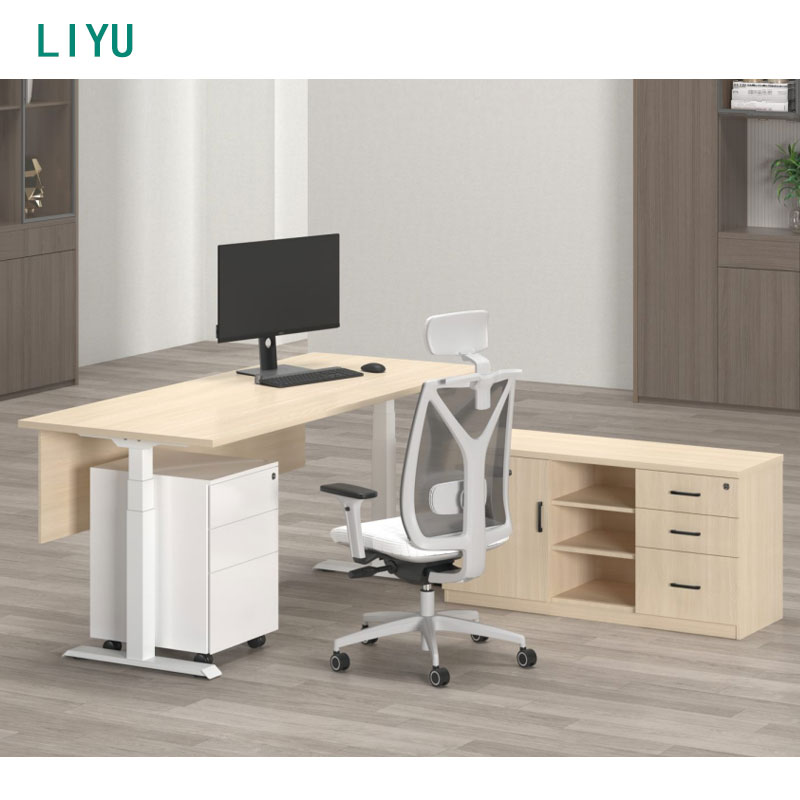
In this post, we’ll explore practical desk placement ideas for different home office layouts. You’ll learn how to position your desk near a window, against a wall, in a corner, or in a dedicated study room while avoiding common mistakes. Whether you are planning a compact workstation or upgrading to a Height Adjustable Desk, this guide will help you create a smarter and more comfortable home office..
Desk placement is more important than many people think. A desk is not only a surface for your laptop or monitor. It is the center of your working environment. The way you place it affects your posture, lighting, concentration, cable organization, and daily movement.
If the desk is too close to a bright window, your screen may reflect sunlight. If it is too far from power outlets, cables may become messy and unsafe. If the desk blocks a door, closet, or walking path, the room will feel crowded. If your video call background is messy, your online meetings may look less professional.
For users with a Height Adjustable Desk, placement becomes even more important. A height-adjustable model needs enough vertical clearance, enough cable length, and enough space for sitting and standing. If it is placed under low shelves or too close to other furniture, the lifting function may not work comfortably.
A good home office desk position should support five basic goals:
● Comfortable posture
● Good natural or artificial lighting
● Easy access to power outlets
● Clean and professional background
● Smooth movement around the room
When these factors are planned well, even a small home office can feel more comfortable and efficient.
Placing the desk beside a window is one of the best choices for many home offices. Natural light can make the workspace feel brighter, fresher, and more open. It can also reduce the feeling of being closed in during long working hours.
However, the desk should not always face the window directly. If your monitor faces a bright window, sunlight may cause screen glare and eye strain. If your back is directly against the window, video calls may appear dark because the camera is affected by strong backlighting.
A better solution is to place the desk beside the window. This allows natural light to enter from the side, which is usually more comfortable for screen work. It also gives the user access to daylight without making the monitor difficult to see.
This placement is suitable for writers, designers, remote workers, students, and anyone who spends many hours at the desk. If you use a Height Adjustable Desk, make sure the window handle, curtain, or nearby shelf does not block the desk when it rises.
A wall-facing desk is one of the most space-saving layouts. It works especially well in small bedrooms, apartments, study corners, and shared rooms. When the desk is placed against a wall, the center of the room remains open, making the space easier to walk through.
This layout also helps reduce distractions. Instead of facing the entire room, the user faces a simple wall. This can be useful for focused work such as writing, studying, accounting, coding, or online meetings.
Wall placement is also practical for cable management. Since power outlets are usually located on walls, it is easier to connect a laptop, monitor, desk lamp, charger, and docking station. If you use a Height Adjustable Desk, leave a small gap between the desk and the wall so cables can move safely when the desk goes up and down.
To make this layout more functional, you can add shelves, pegboards, or wall organizers above the desk. This helps save floor space and keeps the desktop cleaner.
Some people feel more comfortable when they can see the door while working. This desk position creates a more open and confident feeling. It can also reduce the discomfort of having people walk behind you unexpectedly.
This layout is best for dedicated home offices or larger study rooms. It gives the workspace a more professional appearance and makes the desk feel like the main workstation in the room.
However, this placement needs more space. You must leave enough room behind the chair and enough walking space around the desk. Cable management can also be more difficult because the desk may not be close to the wall.
If you use a Height Adjustable Desk in this position, choose a model with a clean frame design and good cable management. Since the back of the desk may be visible, the desk should look neat from all sides.
Corner desk placement is a practical choice for small home offices. It uses space that may otherwise be wasted and keeps the main room area open. This layout is common in bedrooms, apartments, guest rooms, and compact workspaces.
A corner setup can work with a small rectangular desk, an L-shaped desk, or a compact Height Adjustable Desk. It is suitable for users who need a clear work zone but do not have a separate office room.
The main risk is that the corner may feel cramped if the desk is too large or if the chair cannot move freely. Before choosing this layout, measure the wall length, chair space, and nearby furniture. You should be able to sit, stand, and move without hitting the bed, cabinet, or wall.
If planned well, corner placement can create a productive workstation in a very limited space.
Desk Placement | Best For | Main Advantages | Things to Watch |
Beside a window | Long work hours, natural light users | Bright, comfortable, pleasant view | Avoid glare and backlighting |
Against a wall | Small rooms, focused work | Saves space, easy cable setup | May feel less open |
Facing the door | Dedicated home offices | Professional, open, comfortable | Needs more room |
Corner placement | Bedrooms, apartments | Uses unused space efficiently | Can feel cramped |
Center of room | Large home offices | Premium and flexible layout | Requires strong cable management |
In a bedroom home office, space is usually limited. The desk should not block the bed, wardrobe, door, or window. The best position is often against a wall or beside a window.
A compact desk is usually better than a large workstation in this type of room. If you choose a Height Adjustable Desk, select a quiet and space-saving model. Since the desk is inside a personal living space, it should also match the bedroom style. White, black, oak, walnut, and light wood finishes are common choices.
The key is to keep the layout simple. A good bedroom desk position should support work without making the room feel crowded.
A living room home office needs to balance function and appearance. Since the desk may be visible to family members or guests, it should look clean and organized.
Good places for a living room desk include beside a wall, near a window, behind a sofa, or in a quiet corner. Avoid placing the desk too close to the TV, kitchen, or main walkway because these areas can create distractions.
Cable management is very important in this space. A Height Adjustable Desk with cable trays, grommets, or under-desk storage can help keep the room tidy. The desk should feel like part of the living room, not an unfinished work corner.
A dedicated study room gives you more freedom. You can place the desk against a wall, beside a window, facing the door, or even in the center of the room.
For full-time remote work, a larger desk with good storage and cable management is usually better. For reading and writing, a window-side layout may feel more comfortable. For frequent video meetings, place the desk so the background behind you looks clean and professional.
A Height Adjustable Desk works especially well in a dedicated study room because there is usually enough space for sitting, standing, and moving around.
If two people use the same home office, desk placement should consider privacy, noise, and movement. Two desks can be arranged side by side, back to back, or on opposite walls.
Side-by-side placement is good for communication but may reduce privacy. Back-to-back placement creates more separation but requires more space. Opposite-wall placement can help each person focus better.
If both users have a Height Adjustable Desk, make sure each desk has enough vertical clearance and enough cable length. The desks should not hit shelves, lamps, or each other when adjusted.
Natural light is useful, but direct glare can reduce comfort. Avoid placing your monitor directly in front of a bright window. Also avoid sitting with a strong window behind you during video calls.
The best option is usually side lighting. Place the desk so the window is to your left or right. Curtains, blinds, and adjustable lamps can also help control brightness throughout the day.
For a Height Adjustable Desk, check lighting at both sitting and standing heights. A monitor that looks fine while sitting may reflect more light when raised.
A practical desk position should be close to power outlets. Most users need to connect a laptop, monitor, phone charger, desk lamp, printer, or docking station.
If the desk is too far from outlets, extension cords may become messy. This is not only unattractive but also unsafe.
A Height Adjustable Desk needs extra cable planning because the desktop moves. Use longer cables, flexible cable sleeves, cable trays, and clips to prevent pulling or tangling.
Desk placement should support good posture. The chair should move freely. Your monitor should be at eye level, and your keyboard should allow your arms to rest naturally.
There should also be enough legroom under the desk. If the desk is squeezed into a narrow corner, it may look space-saving but feel uncomfortable during real work.
For a Height Adjustable Desk, make sure you have enough standing space. You should be able to stand naturally without bumping into furniture.
Remote work has made video call backgrounds more important. Before placing the desk, think about what the camera will show behind you.
Avoid backgrounds such as an unmade bed, messy kitchen, hallway, or bright window. A clean wall, bookshelf, curtain, cabinet, or plant can create a more professional look.
If you use a Height Adjustable Desk, test your camera angle in both sitting and standing positions.
This can cause screen glare and eye strain. A side-window layout is usually more comfortable.
This can create strong backlighting during video calls and make your face look dark.
A desk far from outlets often creates messy cables and unsafe extension cord use.
A large desk may look impressive, but it can make a small room difficult to use. The desk should fit the room, not dominate it.
This is especially important for a Height Adjustable Desk. Low shelves, wall cabinets, and window frames may block the desk when it rises.
Home Office Need | Recommended Desk Type | Placement Tip |
Small bedroom office | Compact desk or compact Height Adjustable Desk | Place against a wall or in a corner |
Full-time remote work | Larger ergonomic desk | Place near power and natural light |
Dual-monitor setup | Wider desk with strong frame | Avoid direct window glare |
Video meeting setup | Clean design desk | Place with a simple background |
Standing work | Height Adjustable Desk | Ensure vertical clearance and cable length |
The right desk should match both your room and your work habits. For small rooms, compact designs are usually better. For full-time work, a larger and more stable desk is worth considering. For people who want sitting and standing flexibility, a Height Adjustable Desk can improve the function of the home office if it is placed correctly.
So, where to put desk in home office? For most users, the best position is beside a window, against a wall, or in a quiet corner. These layouts usually provide a good balance of light, focus, space efficiency, and cable access.
If you have a larger room, placing the desk facing the door or in the center of the room can create a more professional layout. If you use a Height Adjustable Desk, remember to consider vertical clearance, cable length, chair movement, and standing space.
The right desk placement can make your home office brighter, cleaner, and more comfortable. Combined with a well-designed desk, it can turn even a small area into a practical and productive workspace.
The best place to put a desk in a home office is usually beside a window, against a wall, or in a quiet corner. The desk should be close to power outlets, away from distractions, and positioned to avoid screen glare.
A desk can face the wall if you want fewer distractions and better space use. If you prefer natural light, place the desk beside the window instead of directly facing it to reduce glare.
It can be good if the light is controlled, but placing a monitor directly in front of a bright window may cause eye strain. A side-window layout is often better for long screen work.
A Height Adjustable Desk should be placed where it has enough vertical clearance, cable length, and space for both sitting and standing. Avoid placing it under low shelves or too close to fixed cabinets.
For a small home office, a compact desk, corner desk, or compact Height Adjustable Desk is usually a good choice. It should provide enough work surface while keeping the room open and easy to move around.


