
Views: 0 Author: Site Editor Publish Time: 2026-09-02 Origin: Site


Poor workstation ergonomics take a measurable physical toll on the workforce. Repetitive strain injuries, chronic lumbar pain, and accelerated fatigue stem directly from improper setups. The standard fixed desk height relies entirely on a statistical "average user" fallacy. This outdated manufacturing standard leaves the vast majority of people operating in compromised, non-neutral postures that degrade focus and damage joint health over time.
When evaluating exactly how high is a office desk supposed to be, you must move beyond generic furniture advice. Achieving true comfort requires a precise, biomechanical framework for measuring and selecting a setup. Your workstation must support your exact anatomical requirements. This technical guide breaks down the structural flaws of standard desks and provides actionable criteria for aligning your workspace with your body.
Most commercial furniture manufacturers build fixed desks to a height of 28 to 30 inches (71 to 76 cm). This measurement originates from mid-20th-century industrial standards based on military anthropometric data. Designers calculated this height using the physical dimensions of a 5'10" male. This historical baseline completely ignores the anatomical realities of a diverse modern workforce. It forces anyone outside a very narrow height percentile to adapt their body to the furniture, rather than adapting the furniture to the body.
This standard fails shorter users dramatically. If you are under 5'8", a 29-inch desk forces you to elevate your shoulders to reach the keyboard. This constant elevation causes upper trapezius strain and neck stiffness. To compensate, shorter users often raise their chairs. This lifts their feet off the floor, causing pressure on the popliteal artery behind the knee and restricting blood flow. The standard also fails users over 5'10". Taller individuals must hunch forward to reach a 29-inch surface. This induces severe cervical spine flexion and compresses the lumbar discs.
The thickness of the desktop material also plays a role in this fallacy. A standard laminate top measures about one inch thick, while solid wood tops can exceed 1.5 inches. Manufacturers often measure the desk height to the top of the surface, meaning the actual clearance underneath for your legs is even less than advertised. This lack of clearance creates immediate friction for taller users trying to slide their knees under the workstation.
True ergonomic alignment requires desk heights that match actual human proportions. For the average population, the correct sitting desk height ranges from 25 to 27.5 inches (60 to 70 cm). This sits significantly lower than the commercial standard. The gap between what manufacturers produce and what the human body requires creates a massive ergonomic deficit in most offices.
Standing desk baselines highlight an even wider variance. A proper standing posture requires a surface height anywhere from 37 to 47 inches, depending on the user's height and footwear. Static furniture cannot bridge this gap. Understanding these baselines is the first step in diagnosing workstation pain and implementing structural corrections.
To establish your personal baseline, you must measure your seated elbow height. Follow these exact steps:
Your upper body dictates the primary mechanical requirements for your desktop surface. When you type or use a mouse, your shoulders must remain entirely relaxed. They should not hike upward toward your ears. Any elevation indicates the desk surface is too high. Sustained shoulder elevation leads directly to tension headaches and rotator cuff fatigue.
You must maintain your forearm and upper arm angle within an acceptable ergonomic range of 70 to 135 degrees. A 90-degree angle serves as the neutral starting baseline. Your forearms should rest parallel to the floor. Position your wrists in a neutral, floating posture over your peripheral inputs. Do not plant your wrists heavily on the edge of the desk. Floating wrists prevent median nerve compression, which is the primary catalyst for carpal tunnel syndrome.
Keyboard placement heavily influences this alignment. Push your keyboard back about two to three inches from the front edge of the desk. This provides just enough space to rest the fleshy part of your palm during micro-pauses in typing, without encouraging you to anchor your wrists while actively striking the keys.
You cannot determine your proper desk height until you calibrate your chair. Chair height calibration is the mandatory prerequisite step. A standard ergonomic chair height typically falls between 16.5 and 18 inches from the floor. Adjust the pneumatic cylinder until your hips and knees rest at exact 90-degree angles.
Your feet must plant firmly on the floor. If your desk requires you to raise your chair so high that your feet dangle, you must introduce a stable, angled footrest. A footrest restores the 90-degree knee angle and transfers weight off your lower back. Look for a footrest with a 15 to 20-degree tilt to keep your ankles in a neutral position.
Your core should remain engaged but supported by the chair's lumbar mechanism. Do not lean forward to close the gap between your torso and the desk edge. Bring the desk and the peripherals to you. If you find yourself leaning forward, your monitor is likely too far away or your text scaling is too small.
Desk height directly influences monitor positioning. Align the top third of your monitor screen at or slightly below your resting eye level. When you look straight ahead, your gaze should naturally fall near the browser address bar. This geometry keeps your cervical spine in a neutral, upright position.
Maintain a focal viewing distance of 20 to 30 inches. This roughly equals an arm's length. Placing monitors too far away encourages forward head posture, where the neck juts out to read small text. For users with specific visual needs, such as bifocal wearers, advanced adjustments are necessary. Lower the screen up to 6 inches and tilt it upward 30 to 40 degrees. This prevents the severe neck hyperextension caused by tilting the head back to look through the bottom of corrective lenses.
If you use a dual-monitor setup, position the primary monitor directly in front of you and the secondary monitor off to the side, angled inward. If you use both monitors equally, center the bezel between them directly in front of your nose. Mount them on independent VESA arms to ensure you can adjust their height independently of the desk surface.
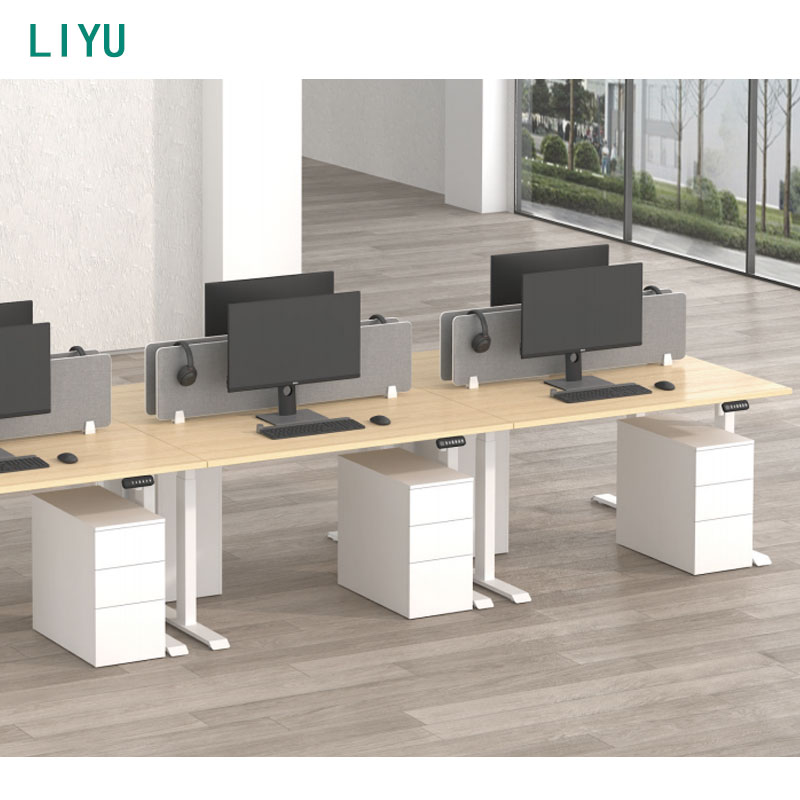
You can retrofit a standard fixed desk if replacing it is not an option. Articulating keyboard trays attach to the underside of the desktop. They allow you to drop the typing surface down to your natural elbow height, bypassing the 29-inch desk surface entirely. Monitor arms clamp to the back edge, providing independent height and depth adjustments for your screens.
Retrofitting carries distinct limitations. A fixed desk with a keyboard tray cannot easily support multi-user workstations. It lacks postural variety, trapping you in a seated position all day. Dropping a keyboard tray too low creates severe knee-clearance issues. Your thighs may scrape against the tray hardware, restricting lower body movement. Most commercial keyboard trays require a 17-inch to 22-inch mounting track under the desk. If your desk has a shallow depth or a crossbar running underneath, you will not be able to install the track.
Investing in a height adjustable desk eliminates the friction of static sitting. These frames accommodate exact anatomical measurements for both sitting and standing. You can choose between pneumatic and electric lifting mechanisms. Pneumatic desks use gas cylinders for rapid, manual adjustments without requiring power outlets. Electric desks utilize internal motors for smooth, heavy-duty lifting.
The true operational value of an adjustable frame lies in micro-adjustments. You do not just use it to switch between sitting and standing. You can adjust the desk a half-inch to accommodate thicker footwear. You can drop it slightly when you recline in your chair for a phone call. These daily posture shifts mitigate spinal compression and keep synovial fluid moving through your joints.
When evaluating electric models, pay attention to the motor configuration. Single-motor desks use a hex rod to transfer power to both legs. They are cost-effective but slower. Dual-motor desks place a dedicated motor inside each lifting column. This provides faster transition speeds, higher weight capacities, and better long-term reliability.
Leadership roles often demand workstations that project authority without sacrificing biomechanics. An adjustable executive desk balances premium aesthetics with heavy-duty lifting capabilities. These units frequently feature solid wood construction, expansive L-shape footprints, and integrated modesty panels.
Because executive setups utilize heavier materials, you must evaluate weight capacity requirements carefully. Heavy multi-monitor arrays, solid wood tops, and desktop hardware demand robust dual or quad-motor systems. The lifting columns must handle the structural load without sacrificing transition speed or burning out the internal gears.
Modesty panels present a unique engineering challenge on executive sit-stand desks. The panel must move with the desk surface without hitting the floor when the desk is lowered to its minimum height. Look for designs where the modesty panel is integrated directly into the lifting columns or features a telescoping design to prevent clearance issues.
| Desk Type | Primary Advantage | Biomechanical Limitation | Best Use Case |
|---|---|---|---|
| Standard Fixed Desk | High structural stability | Forces non-neutral postures for most users | Short-term use or perfectly matched user height |
| Modified Fixed Desk | Corrects typing height via tray | Restricts knee clearance under the desk | Retrofitting existing office infrastructure |
| Standard Adjustable Desk | Full sit-stand postural variety | Requires cable management discipline | Daily computer work and shared workstations |
| Executive Adjustable Desk | High load capacity and aesthetics | Heavier frame requires stronger motors | Private offices requiring large surface areas |
When selecting a frame, you must evaluate its minimum and maximum height range, known as the stroke. The ANSI/BIFMA G1 standard recommends a height range of 22.6 to 48.7 inches. This broad stroke ensures maximum workforce inclusivity, accommodating users from the 5th percentile female to the 95th percentile male.
The absolute minimum height is the most critical specification. A high-quality ergonomic office desk must drop down to match your seated elbow height. For many users, this means the frame must reach the 24-inch (60 cm) mark. If a desk bottoms out at 28 inches, it fails as an ergonomic sitting solution for anyone under 5'10".
To achieve this massive stroke range, manufacturers use three-stage lifting columns. A three-stage column consists of three overlapping steel tubes that telescope outward. Two-stage columns only have two tubes, which severely limits their minimum drop height and maximum standing height. Always verify the column stage count before procuring a frame.
A desk that wobbles disrupts focus and damages monitor mounts. Assess the frame architecture carefully. Look for heavy steel cross-supports, thick lifting columns, and wedge designs at the motor housing. Three-stage columns provide significantly better stability at maximum standing extension than two-stage columns because they maintain more overlap between the steel tubes when fully extended.
Internal glide bearings dictate the smoothness of the transition. High-quality acetal glides prevent the steel tubes from rubbing against each other, eliminating lateral wobble. Cheaper nylon glides wear down quickly, introducing play into the legs after a few months of use.
Evaluate the motor reliability and transition speed. A standard transition speed should measure around 1.2 to 1.5 inches per second. Listen to the noise levels; quality motors operate below 50 decibels. Always review the manufacturer warranty length on the electronic components, as motors and control boxes are the most common points of failure.
Moving parts introduce logistical challenges to your workspace. You must implement strict cable management solutions. When a desk travels 20 inches vertically, loose cables will snag, pulling monitors off the surface or ripping ports out of your computer. Use cable snakes and under-desk routing trays to secure all wiring.
Gyroscopic collision detection technology is a mandatory safety feature. This sensor detects sudden resistance during automated height transitions. If the desk hits a filing cabinet on the way down, or a window sill on the way up, the gyroscope immediately halts the motor and reverses direction. This protects your hardware from crushing damage and prevents user injury.
Power routing requires planning. Mount a high-quality surge protector directly to the underside of the desktop. Plug all your monitors, chargers, and the desk motor into this single strip. Then, route the single power cord from the surge protector down the leg of the desk to the wall outlet. This ensures only one cable moves when the desk changes height.
Upgrading to adjustable ergonomic furniture requires an upfront investment. You must analyze this premium against long-term health outcomes. Musculoskeletal disorders lead to chronic pain, medical interventions, and significant lost productivity. A workstation that supports neutral joint alignment acts as a preventative health measure.
When you eliminate shoulder strain and lumbar compression, daily fatigue drops. Focus increases. The return on investment manifests in sustained energy levels and the avoidance of repetitive strain injuries that require physical therapy. Viewing ergonomic furniture purely as an office expense ignores its function as a critical health tool.
A significant behavioral risk exists with sit-stand workstations. Many users acquire adjustable desks but rarely utilize the standing feature. They fall into the "set and forget" trap due to transition friction. If changing the desk height requires holding a button for 15 seconds while guessing the correct height, users simply stop doing it.
You can mitigate this risk by prioritizing desks with programmable memory presets. A one-touch controller removes the cognitive and physical friction of changing postures. You press a single button, and the desk automatically travels to your exact pre-calibrated sitting or standing height. Removing this friction guarantees higher daily utilization of the ergonomic features.
A: Most standard fixed office desks sit between 28 and 30 inches (71 to 76 cm) from the floor. Manufacturers historically designed this height for a user around 5'10". It forces shorter users to elevate their shoulders and taller users to hunch forward.
A: Input your exact body height into an ergonomic calculator. The tool outputs recommended measurements for your chair height, seated desk height, and standing desk height. Always verify these digital recommendations by physically measuring your seated elbow height to ensure maximum accuracy.
A: Your desk surface should sit exactly at or slightly below your resting elbow height. This allows your forearms to remain parallel to the floor. Placing the desk higher than your elbows forces unnatural shoulder elevation and causes severe neck strain.
A: Yes. A 30-inch desk is significantly too high for someone who is 5'5". A user of this height typically requires a seated desk height of around 24 to 25 inches. Using a 30-inch desk requires an adjustable chair and a tall footrest to achieve proper alignment.
A: The ideal standing desk height generally falls between 37 and 47 inches, depending on the user. Your standing desk should meet your elbows at a 90-degree angle while you stand straight. Wear your typical work shoes when measuring this height.
A: Chair height serves as the foundational measurement for your entire workstation. You must adjust your chair so your feet rest flat and your knees bend at 90 degrees. Only after setting this baseline can you accurately measure the distance from the floor to your elbows for desk height.
A: Yes. An articulating keyboard tray can lower your typing surface by several inches. This allows you to achieve a 90-degree elbow angle without replacing a fixed-height desk. However, you must ensure the tray provides enough clearance so it does not hit your knees.


