
Views: 0 Author: Site Editor Publish Time: 2026-09-05 Origin: Site


When setting up a workspace, determining how high is an office desk usually points to a fixed measurement. Most commercial workspaces feature desks sitting 29 to 30 inches off the floor. However, this static dimension creates a severe mismatch between human biometrics and workstation design. Prolonged use of poorly sized surfaces directly correlates to musculoskeletal disorders. Workers routinely experience neck strain, wrist fatigue, and lower back pain.
The core problem lies in historical manufacturing norms. Fixed work surfaces cater to an outdated physical average, while modern workforces possess diverse physical profiles. A single desk height cannot accommodate everyone safely. We must shift our focus from merely measuring existing furniture to evaluating workspace solutions based on ergonomic science. This approach creates a reliable framework for deciding when to modify a fixed desk or invest in dynamic alternatives.
Standard commercial office furniture relies on rigid dimensions. Manufacturers typically build fixed desks measuring 29 to 30 inches (74 to 76 cm) tall. You measure this height from the floor directly to the top of the work surface. This measurement includes the thickness of the desktop material. Desktop thickness usually ranges from 0.75 inches for high-density laminate to 1.5 inches for solid wood or heavy veneer tops. The supporting legs or C-frames make up the remaining height.
Height does not operate in a vacuum. It interacts heavily with overall desk dimensions. A standard desk depth spans 20 to 30 inches. Widths generally start at 48 inches and scale upward. Desk depth dictates your monitor viewing distance and defines your safe reach zones. A shallow desk forces monitors too close to your eyes, increasing ocular fatigue. A deep desk requires excessive reaching for peripherals. Both scenarios compound the physical strain of an improper desk height.
| Reach Zone | Distance from Desk Edge | Optimal Items to Store |
|---|---|---|
| Primary Zone | 0 to 15 inches | Keyboard, mouse, notebook, primary tools |
| Secondary Zone | 15 to 27 inches | Monitors, reference materials, phone |
| Tertiary Zone | 27+ inches | Desk lamps, plants, rarely used accessories |
The 29-inch standard did not originate from modern ergonomic studies. It evolved from early 20th-century writing furniture. Designers built these early desks specifically for pen-and-paper tasks. Writing requires your arms to rest directly on the physical desk surface. This posture naturally accommodates a slightly higher working plane. During the mid-century era, heavy steel tanker desks cemented this 29-inch height as a manufacturing default.
Modern typing demands a completely different posture. Keyboards and mice add one to two inches of functional height. They effectively raise your working plane above the physical desktop. When you place a mechanical keyboard on a 29-inch desk, your hands sit at 30 or 31 inches. This forces most users to elevate their shoulders to type. The historical standard fails to account for modern peripheral devices, creating a widespread ergonomic deficit across modern offices.
A successful workstation must meet two criteria. It must support neutral joint alignment and provide sustained comfort over long periods. Fixed desks fail these criteria for most people. Anthropometric data shows that a 29-inch desk optimally fits users between 5'10" and 6'0" tall. Anyone outside this narrow demographic faces immediate physical challenges. The idea of an "average user" is a manufacturing convenience, not a biological reality.
Shorter users must raise their chairs to reach the keyboard. This leaves their feet dangling, causing lower back compression and restricting blood flow to the thighs. Taller users must hunch over, straining their cervical spine. We call this cumulative physical strain "postural debt." Shrugging your shoulders or slouching over a 40-hour workweek damages soft tissues. Postural debt eventually leads to chronic pain, requiring medical intervention and causing significant drops in daily output.
You can determine your ideal desk height using a simple biometric formula. This process requires a tape measure and a few minutes of observation. Follow these exact steps to find your seated baseline:
You apply this exact same 90-degree rule to standing postures. Stand naturally in your typical work shoes. Relax your shoulders and bend your elbows. Measure from the floor to your elbow. For an average 5'11" user, the ideal standing desk height hits approximately 44 inches. These precise measurements dictate the required height for an ergonomic office desk. They ensure neutral alignment during both static and dynamic workflows.
Several daily variables alter your baseline measurements. Footwear plays a massive role in standing ergonomics. High heels, thick-soled sneakers, or heavy work boots change your standing height by up to two inches. Anti-fatigue mats add another half-inch to an inch of elevation. You must account for these additions when programming your standing desk presets.
Seated height fluctuates based on your chair mechanics. Office chair gas cylinders compress slightly under body weight. A standard Class 3 gas lift might sink a quarter-inch, while older cylinders sink further. Seat cushions also compress over time. Your morning seated height might differ slightly from your afternoon seated height. Furthermore, monitor stands and VESA mounts interact with desk height. Your eye level should meet the top third of your screen. If your desk sits too high, you will tilt your neck upward, negating the benefits of proper arm alignment.
You need a systematic way to evaluate your current fixed desk. Use the following checklist to assess ergonomic compliance. If you fail multiple points, your desk requires an intervention.
A desk becomes non-compliant when it forces joint deviation. If you must shrug your shoulders to type, the desk is too high. If you must hunch forward to see your monitor, the setup is failing. Identifying these thresholds helps you justify workspace upgrades.
| User Height | Estimated Seated Elbow Height | Estimated Standing Elbow Height |
|---|---|---|
| 5'2" (157 cm) | 24.5 inches (62 cm) | 38.0 inches (96 cm) |
| 5'6" (168 cm) | 26.5 inches (67 cm) | 41.0 inches (104 cm) |
| 5'10" (178 cm) | 28.0 inches (71 cm) | 43.5 inches (110 cm) |
| 6'2" (188 cm) | 30.0 inches (76 cm) | 46.5 inches (118 cm) |
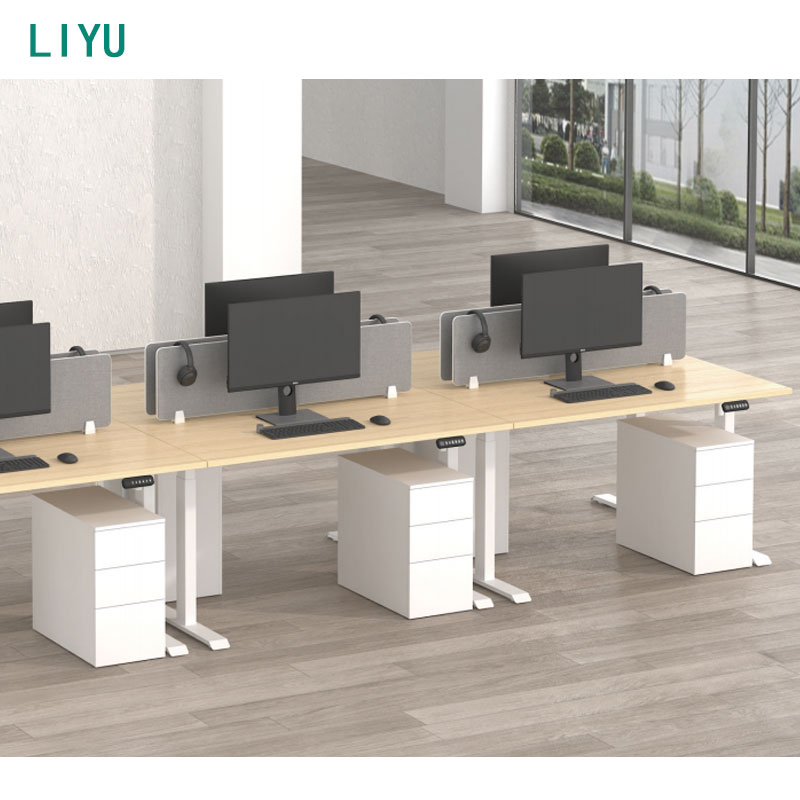
You can retrofit a fixed-height desk to improve its ergonomics. Articulating keyboard trays offer a popular solution. They mount beneath the desktop on a steel track. They lower the typing surface by two to three inches and allow for negative tilt. This modification helps shorter users achieve a 90-degree elbow angle without raising their chairs to uncomfortable heights.
Ergonomic footrests provide another retrofitting option. They raise the floor to meet the user's feet. However, retrofitting has strict limitations. Keyboard trays require a 17-inch to 22-inch mounting track, which often collides with under-desk crossbars. They also push the user further away from the desk, compromising reach zones for other items. Most importantly, retrofitting cannot support sit-stand workflows. The desk remains fundamentally static, locking the user into a single posture all day.
Dynamic workspaces solve the limitations of fixed furniture. A height adjustable desk provides massive mechanical and ergonomic advantages. You can choose between pneumatic and electric models. Electric sit-stand desks offer precise, motorized adjustments at the push of a button, making postural transitions effortless.
Commercial adjustable frames typically feature a massive height range based on their column design. A three-stage lifting column travels from 22 inches up to 48 inches. This expansive stroke length accommodates the 5th to the 95th percentile of the workforce. It ensures proper elbow alignment for nearly all body types. Users can seamlessly transition between sitting and standing. This movement reduces spinal compression, increases blood flow, and prevents muscle stiffness.
Corporate and client-facing environments have unique requirements. Standard sit-stand desks sometimes look too industrial for private offices. Executives need furniture projecting authority. They require premium materials, integrated storage, and substantial footprints that command the room.
An adjustable executive desk bridges this gap perfectly. It combines traditional heavy-wood aesthetics with modern ergonomic functionality. These units conceal lifting columns within modesty panels or decorative wooden legs. They maintain a sophisticated design language while housing powerful dual motors. Executives gain the health benefits of dynamic movement without compromising their office aesthetic or functional storage needs.
Procuring adjustable desks requires a larger initial investment than buying fixed models. Fixed desks utilize simple materials and zero moving parts. Adjustable frames require steel columns, internal glides, control boxes, and electric motors. This mechanical complexity increases the upfront procurement cost for any facility upgrade.
However, you must evaluate the long-term health value. Dynamic desks actively reduce workplace absenteeism. They lower workers' compensation claims related to musculoskeletal disorders. Healthy employees maintain higher energy levels and better focus throughout the afternoon slump. When you factor in extended product lifecycles and improved human performance, the initial investment pays massive dividends in workforce health and retention over time.
Adjustable desks introduce structural trade-offs. Stability becomes a primary concern at maximum height extensions. When a desk rises to 44 inches or higher, it becomes susceptible to lateral (side-to-side) and longitudinal (front-to-back) sway. High-quality frames mitigate this using overlapping column stages, tight internal glide tolerances, and rigid steel crossbars.
Weight capacity also requires careful evaluation. Fixed desks easily support massive static loads. Adjustable desks rely on motor strength to lift dynamic loads. A dual-monitor setup, heavy desktop PC, monitor arms, and mounting accessories easily exceed 100 pounds. You must select a frame capable of lifting your specific equipment load smoothly. Overloading a desk strains the motors, reduces lifting speed, and triggers anti-collision sensors prematurely.
Transitioning to dynamic workstations impacts open-plan office design. Uniform fixed desks create a flat, predictable visual plane across the floor. Varied-height workstations create an undulating, dynamic visual landscape. Some organizations embrace this active aesthetic, while others find it visually chaotic and require strict cable management to maintain order.
Spatial planning requires strict attention. Dynamic desks move vertically. You must account for collision zones. Desks cannot scrape against walls, acoustic partitions, or adjacent furniture. Monitor arms extending past the desk edge pose severe pinching hazards. You must specify partition heights carefully. Privacy screens must either mount directly to the moving desktop or stand tall enough on the floor to provide coverage when the user stands.
Cable management represents the biggest operational risk for adjustable desks. When a desk moves from 28 inches to 45 inches, cables must travel safely. Poorly managed cables suffer extreme tension. They snag on desk frames or nearby filing cabinets. They can rip monitors off VESA mounts or pull expensive PCs onto the floor.
You must implement strict mitigation strategies to protect equipment:
Electric desks rely entirely on their motors. Motor failure renders the desk useless, trapping it at an awkward height. Single-motor desks use a hex rod to drive both legs simultaneously. They cost less but work harder, leading to faster wear. Dual-motor desks place an independent motor in each leg. They offer smoother, quieter, and more reliable operation with higher weight capacities.
Always evaluate the commercial warranty carefully. Manufacturers often separate the frame warranty from the electronic warranty. A company might offer ten years on the steel frame but only two years on the motors and control switch. Look for comprehensive warranties covering all electronic components, including the control box and keypad, for at least five to seven years.
Installing dynamic desks does not guarantee dynamic behavior. Adoption friction is a massive behavioral risk. Many users leave adjustable desks in a seated position indefinitely. They forget to stand, feel intimidated by the keypad controls, or simply do not know their correct ergonomic height.
Mitigate this risk through active training. Provide ergonomic instruction during deployment. Teach users how to calculate their specific seated and standing heights using the 90-degree elbow rule. Program the memory presets for them immediately during installation. Establish a company culture encouraging movement. When leadership normalizes standing during meetings or focused tasks, staff adoption rates increase dramatically.
A: The standard height of a fixed commercial office desk is typically 74 to 76 cm (29 to 30 inches). Manufacturers inherited this industry standard from early 20th-century writing furniture. It was originally designed for pen-and-paper tasks rather than modern computer and keyboard use.
A: Your desk is too high if you must raise your shoulders to type or rest your arms. Symptoms include neck strain, wrist extension, and upper back fatigue. According to the 90-degree elbow rule, your arms should hang completely relaxed at your sides while typing.
A: Proper standing desk height varies entirely by the user. It should rest exactly at your relaxed elbow height. For an average 5'11" user, this is approximately 44 inches. You must factor in variables like shoe heel height and anti-fatigue mats when determining this measurement.
A: Yes, you can retrofit a fixed desk. Installing an articulating keyboard tray lowers your typing surface to achieve a 90-degree elbow angle. Adding an ergonomic footrest raises the floor, supporting your lower body and preventing your legs from dangling if you raise your chair.
A: Yes. They provide significant long-term value by reducing musculoskeletal strain and encouraging postural variation. This dynamic movement decreases workplace absenteeism, lowers physical fatigue, and improves daily focus. The health benefits heavily outweigh the initial procurement costs.
A: For a user who is 5'2", the ideal seated desk height typically falls between 24 and 25 inches. Because standard fixed desks sit at 29 inches, shorter users absolutely require lowered surfaces, keyboard trays, or adjustable frames to prevent severe postural strain.


