
Views: 0 Author: Site Editor Publish Time: 2026-09-04 Origin: Site


Standard furniture dimensions rarely match actual human biomechanics. You often buy a desk based on standard heights, expecting a perfect fit right out of the box. Instead, you end up with musculoskeletal strain. Productivity drops as physical discomfort increases. Purchasing desks based on generic measurements creates a massive ergonomic disconnect in the workplace. This mismatch leads directly to poor posture, chronic joint pain, and reduced focus during long shifts.
We need to shift from generic measurements to a strict technical evaluation framework. You must understand how to measure your ideal seated height accurately based on your specific body proportions. Relying on mass-produced averages simply does not work for the vast majority of the population. You will learn to evaluate fixed versus adjustable solutions based on strict ergonomic criteria rather than aesthetic appeal. This guide provides the exact methodology to determine your perfect desk height. We will explore biomechanical alignment, hardware integration, and structural stability metrics.
Standard Dimensions: The industry standard for a fixed office desk is between 28 and 30 inches (71 to 76 cm) from the floor to the desktop.
The Ergonomic Mismatch: Standard desks are typically optimized for users around 5'10" to 6'0", requiring shorter or taller users to rely on footrests, keyboard trays, or adjustable seating to achieve proper posture.
The Baseline Rule: Ideal seated desk height is dictated by the "elbow rule"—forearms must be parallel to the floor with elbows bent at a roughly 90-degree angle.
The Adjustable Advantage: A height adjustable desk mitigates the risk of fixed-height mismatch, offering ranges (commonly 25.7" to 51.2") that accommodate true ergonomic seated and standing postures.
Understanding how high is a typical office desk requires looking at historical manufacturing data and institutional guidelines. Industry standards dictate specific dimensions for mass production to streamline factory output. Most fixed desks measure between 28 and 30 inches high. Organizations like ANSI and BIFMA establish these guidelines to ensure uniformity across commercial environments. OSHA recommendations also align with this general height range to standardize workplace safety inspections. Canadian ergonomic standards mirror these measurements closely, creating a unified North American manufacturing target. These dimensions allow manufacturers to produce furniture efficiently at scale. However, efficiency in manufacturing does not equal ergonomic perfection for the end user.
You must understand the anatomy of a desk measurement before evaluating your setup. The total height is not just the steel or wood frame. It includes the exact thickness of the desktop surface. Most standard commercial desktops utilize medium-density fiberboard (MDF) or particleboard ranging from 1 to 1.5 inches thick. The official measurement starts from the floor and ends at the top edge of this work surface. You must account for the frame, the leveling glides on the legs, and the surface material. A steel frame might sit at exactly 28 inches. Adding a thick solid wood veneer pushes the final working height to 29.5 inches. This slight difference drastically alters your seated posture and arm angle.
Standardizing Body | Target Demographic | Recommended Fixed Height Range | Primary Application |
|---|---|---|---|
ANSI/BIFMA | North American Adults | 28.5" - 29.5" | Commercial Office Furniture |
OSHA Guidelines | General Workforce | 28" - 30" | Workplace Safety Compliance |
European (EN 527) | European Adults | 74 cm ± 2 cm (approx. 29") | Corporate Workstations |
The standard fails the average user due to the bell-curve approach of mass production. Mass manufacturing targets the absolute middle of the population curve to maximize sales. A 29-inch desk is optimized for someone roughly 5'10" to 6'0" tall. If you are under 5'8", this height becomes highly problematic. You are forced to elevate your chair cylinder to reach the keyboard comfortably. This causes your feet to dangle above the floor, placing pressure on the popliteal artery behind your knees. Dangling feet cut off circulation to the lower legs and destabilize your pelvis. Alternatively, you keep your feet flat on the floor but shrug your shoulders upward to type. Shrugging leads directly to severe trapezius strain, neck pain, and tension headaches. The standard desk simply ignores the margins of human height.
The primary ergonomic evaluation lens is the 90-degree elbow framework. This is a non-negotiable biomechanical standard for seated work. You must measure this accurately to prevent long-term repetitive strain injuries.
Sit in your primary office chair with your lower back firmly against the lumbar support.
Place your feet completely flat on the floor, ensuring your knees are bent at a 90-degree angle.
Adjust the chair cylinder until your thighs are perfectly parallel to the floor.
Relax your shoulders completely, letting your upper arms hang naturally at your sides.
Bend your elbows at a 90-degree angle, pointing your hands straight forward.
Measure the exact distance from the floor to the underside of your elbow.
This specific measurement is your true seated desk height. It dictates exactly where your keyboard should rest. This framework prevents shoulder elevation and dangerous upward wrist extension. If your desk forces your hands higher than your elbows, you will compress the carpal tunnel over time.
You must factor in peripheral thickness when calculating your final desk height. The actual desk surface often needs to sit slightly below your exact elbow measurement. Keyboards and mice add their own physical height to the equation. A mechanical keyboard with high-profile switches can add up to an inch and a half of elevation. If your desk matches your elbow height exactly, the keyboard pushes your hands too high. Your forearms must remain perfectly parallel to the ground while typing. Lowering the desk surface slightly accommodates these peripherals. This ensures your wrists remain neutral during long typing sessions, preventing tendon inflammation.
The full workstation ecosystem alters your required desk height constantly. You do not work in a vacuum. Shoe heel height changes your posture daily. Dress shoes or boots add significantly more height than flat sneakers or socks. Chair cylinder compression also plays a major role in your daily measurements. Gas cylinders sink slightly when you sit on them, and older cylinders compress more over time. Carpet thickness impacts how high your chair sits off the subfloor. A plush carpet absorbs the chair casters, lowering your effective seated height. These factors alter the required desk height by critical fractions of an inch. You must measure your elbow height while wearing your typical work shoes and sitting on your actual office flooring.
Desk height interacts directly with eye-level and monitor placement. Your hands dictate the desk surface height, but your eyes dictate the monitor height. The top bezel of your screen must sit exactly at eye level. This prevents cervical spine flexion. Looking down at a screen causes severe neck pain and disc compression over time. If your desk is lowered to meet your elbow height, your monitor drops too. You will likely need a monitor arm to bridge this vertical gap. A monitor arm allows you to separate keyboard height from screen height entirely. This creates a perfectly aligned ergonomic environment where your hands rest low and your head remains upright.
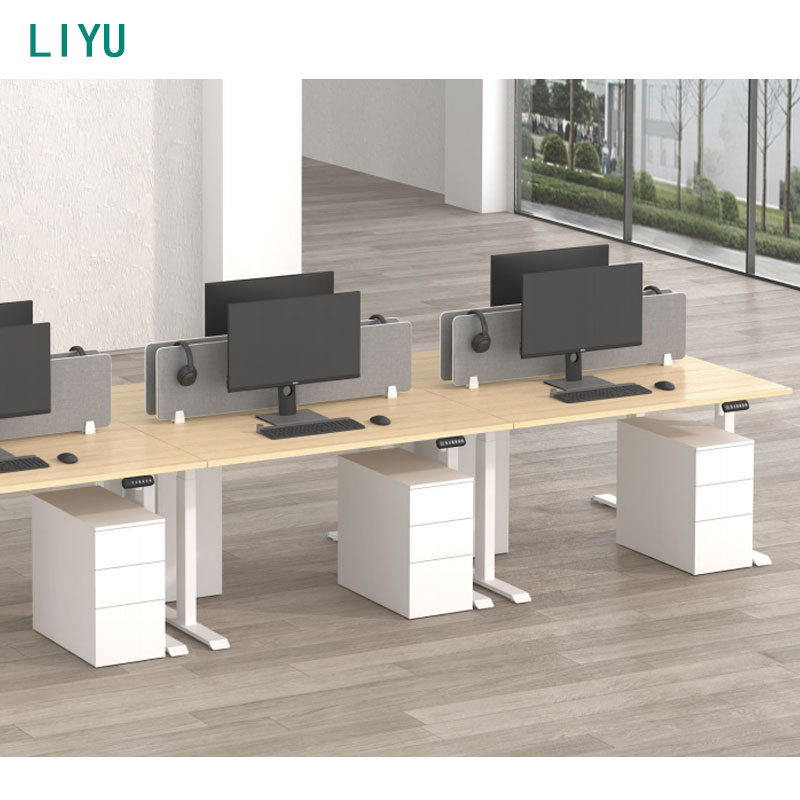
The traditional ergonomic office desk relies on a static, fixed-height frame. This design offers maximum lateral and longitudinal stability. Four solid steel or wood legs prevent almost all wobble, even under heavy loads. Fixed desks carry zero mechanical failure risk. There are no internal motors to burn out. There are no electronic control boxes to short circuit or malfunction. They are incredibly durable, straightforward, and require zero maintenance over a decades-long lifespan.
However, fixed desks are entirely rigid. They require aftermarket modifications for non-average users to achieve ergonomic compliance. If the desk is too high, you must install an under-desk keyboard tray to lower your typing surface. You might also need a heavy-duty ergonomic footrest to support your legs and stabilize your pelvis. These additions complicate the workstation and restrict leg movement. Fixed desks are best for environments with uniform user heights or shift work where everyone uses the exact same equipment. They work exceptionally well for heavy equipment setups requiring absolute stability. If you mount heavy machinery, testing equipment, or multiple large CRT monitors, a fixed frame provides unmatched peace of mind.
A modern height adjustable desk utilizes electric motors housed inside the lifting columns to change elevations. Standard dual-motor adjustment ranges typically span from 25.7 inches to 51.2 inches. Some budget models range from 28.3 inches to 46.5 inches. These technical specifications dictate how well the desk fits extreme height percentiles. Dual motors provide smoother lifting capacities and prevent uneven raising. They handle heavier desktop loads without straining the internal planetary gears.
You must understand the standing transition rule when using these desks. Seated height strictly follows the elbow rule. However, transitioning to standing changes your biomechanics entirely. Users often need to add 1 to 2 inches to their baseline elbow height when standing. This accommodates natural posture shifts as your spine decompresses. It accounts for the compression of polyurethane anti-fatigue mats. It also factors in supportive standing footwear. You do not simply stand up and use the exact same elbow measurement you used while seated.
Adjustable desks offer exact micro-adjustments for seated work. This is their greatest hidden benefit, far beyond the ability to stand. They allow a seamless transition to standing, but they also let you dial in your seated height to the millimeter. They accommodate multiple users sharing the same workspace effortlessly. The cons include a reliance on electrical components that will eventually degrade. Potential stability issues arise at maximum heights. A desk extended to 50 inches will inherently sway more than a desk resting at 29 inches due to the lack of tube overlap in the extended columns.
The adjustable executive desk merges corporate aesthetics with ergonomic function. Modern executive desks integrate heavy-duty lifting columns into massive wood frames. They often feature large modesty panels that drop down to hide cables and legs. They utilize thick wood veneers, solid timber edges, and premium finishes. The mechanical components are completely concealed within the cabinetry. This maintains a high-end, professional appearance suitable for client-facing environments.
You must evaluate the physical trade-offs of this design. You balance maintaining corporate design standards with achieving ergonomic compliance. Executive desks are significantly heavier than standard sit-stand frames. The motors must be powerful enough to lift the heavy wood frame, the modesty panel, plus all desktop equipment. Modesty panels can sometimes restrict knee clearance when seated, forcing you to sit further back from the keyboard. You must ensure the design does not compromise the 90-degree elbow framework by blocking your knees. Premium models achieve this balance flawlessly by using synchronized multi-motor systems, but they require careful specification review before installation.
Desk Category | Stability Rating | Ergonomic Adaptability | Mechanical Risk | Ideal Use Case |
|---|---|---|---|---|
Fixed Height Desk | Exceptional (No moving parts) | Low (Requires footrests/trays) | None | Heavy equipment, uniform users. |
Electric Adjustable Desk | Moderate to High (Depends on frame) | Exceptional (Micro-adjustments) | Moderate (Motor/Control box lifespan) | Dynamic workspaces, varied user heights. |
Adjustable Executive Desk | High (Heavy frame dampens sway) | High (Concealed mechanics) | Moderate (Requires heavy-duty motors) | Private offices, client-facing roles. |
Sizing for outliers requires specific hardware choices during the specification phase. Short and tall users cannot rely on standard two-stage frames. You must evaluate desks with 3-stage lifting columns. A 3-stage column features three telescoping metal segments rather than two. This allows the desk to drop below 25 inches for shorter users, accommodating people down to 5'0" tall. It prevents the need for cumbersome footrests. It also allows the desk to extend higher for taller users while maintaining more tube overlap inside the leg. You must evaluate maximum height stability for users over 6'2". A robust 3-stage frame prevents the desk from rocking front-to-back during aggressive typing sessions.
Multi-user and hot-desking requirements demand specific electronic features. Shared workstations require programmable memory presets on the control handset. Memory keypads allow rapid, accurate height adjustments between shift changes. Users should not rely on manual guessing every time they switch desks. Guessing leads to incorrect postures, shoulder shrugging, and eventual strain. A user simply presses their assigned button. The desk moves exactly to their pre-measured elbow height. This ensures ergonomic compliance across different shifts and different personnel without requiring constant re-measurement.
Hardware and clearance integration is a critical evaluation step that many buyers miss. You must look under the desk surface. Detail how under-desk crossbars impact knee clearance. A low-hanging crossbar on a T-frame desk will hit your shins or knees. This forces you to sit further back, ruining your posture and causing you to reach forward for the keyboard. Desktop thickness affects the mounting of aftermarket accessories. C-clamp monitor arms require a specific thickness to grip securely without damaging the wood. Microphone stands and clamp-on lighting need clean edge profiles. Ensure the desk surface does not have excessive knife-edge bevels that prevent clamps from achieving a flush, secure grip.
The wobble factor is a physical reality of adjustable furniture. Desk sway happens when columns extend to their maximum height. You must evaluate frame weight to ensure stability. Heavier steel frames dampen vibrations better than lightweight aluminum frames. Check the foot length of the desk base. Longer steel feet provide a wider center of gravity on the floor. This prevents front-to-back rocking when you lean on the desk. Glide tolerances inside the lifting columns dictate lateral sway. Tighter manufacturing tolerances on the internal Delrin glide bearings mean less wiggle between the metal segments. Always test stability during both seated typing and standing to ensure the monitors do not shake.
Cable management realities present a hidden risk that can destroy equipment. Adjustable desks move up and down constantly throughout the day. This creates severe cable tension. Snagging a power cord during a standing transition can rip a monitor off the desk or snap a motherboard port. You must detail the necessity of cable snakes or drag chains. Cable snakes protect wires as they travel from the floor outlet to the moving surface. Install under-desk wire baskets to hold heavy power bricks and excess wire length. Buy adequately long power strips. Mount the power strip directly to the underside of the desktop using wood screws. This ensures only one thick power cable moves with the desk, eliminating the risk of snagging individual peripheral cords.
Warranty and motor lifespan define the trustworthiness of a desk brand. Do not just look at the warranty for the steel frame. Steel rarely breaks in an office environment. You need a framework for evaluating the electronic components. Look for 7-to-10-year warranties specifically covering the motors, control boxes, and memory keypads. The electronics are the most vulnerable part of an adjustable desk. Dual motors generally outlast single-motor systems because they share the lifting load, reducing heat buildup in the motor housing. Protect your investment by verifying the warranty covers electrical failure and provides rapid replacement parts, not just structural defect coverage.
Measure your seated elbow height while wearing your typical work shoes and sitting in your primary office chair.
Specify a desk frame with 3-stage lifting columns if your measured elbow height falls below 28 inches.
Mount a heavy-duty power strip directly to the underside of the desktop to eliminate cable tension during height transitions.
Install a fully articulating monitor arm to decouple your screen height from your keyboard surface height.
A: The standard height of an office desk ranges from 71 to 76 cm. The most common average across the manufacturing industry is 73.5 cm. This standard applies primarily to fixed-height desks and is designed to fit the median population height.
A: Physical indicators reveal a desk that is too high. You will notice raised shoulders while typing. You may experience upward wrist extension. You might also find yourself hovering your arms above the desk rather than resting them comfortably parallel to the floor.
A: Yes. The greatest benefit of an adjustable desk is the micro-adjustment capability for seated ergonomics. It allows you to perfectly match the desk surface to your exact elbow height. This is highly beneficial even if you never transition to a standing position.
A: Yes. Your feet must be completely flat on the floor. If your desk is too high and your chair is elevated, you must use a firm footrest. Flat feet stabilize your pelvis and properly support your lumbar spine during seated work.
A: The standard thickness for an ergonomic desk surface is 1 inch. While thicker surfaces look premium, they reduce available knee clearance underneath. Thicker surfaces also require you to raise your chair higher to maintain proper elbow alignment.
A: Yes. Premium adjustable executive desks are designed specifically for corporate environments. They feature concealed dual motors, high-quality wood veneers, and integrated modesty panels. These design elements hide the mechanical lifting columns while maintaining a traditional, authoritative appearance.


