
Views: 0 Author: Site Editor Publish Time: 2026-09-28 Origin: Site


The shift to permanent remote work exposes the functional limits of standard residential furniture in Dallas-Fort Worth homes. Professionals constantly fight spatial constraints, hardware overload, and poor ergonomics. Choosing aesthetics over daily performance leads to physical strain and rapid furniture replacement. A standard writing table simply cannot support dual monitors, heavy CPU towers, and ergonomic seating requirements without bowing or wobbling. Selecting a high-performance home office desk dallas requires evaluating spatial footprints, ergonomic mechanisms, and material durability. You need a surface that handles heavy static loads while fitting into specific room dimensions. This guide provides a framework to assess desk configurations that align with specific workflows and DFW real estate realities. We break down exactly how to measure your space, evaluate lift mechanisms, and choose materials that withstand Texas humidity.
Workflow Dictates Form: Desk selection must prioritize hardware load (multi-monitor setups, heavy peripherals) and daily movement patterns over baseline aesthetics.
Commercial vs. Residential Durability: Integrating commercial office furniture into a home setting yields higher ROI through extended warranties and superior load-bearing capacities.
Ergonomic Non-Negotiables: Sit-stand mechanisms and integrated cable management are baseline requirements for full-time remote professionals, not luxury add-ons.
Space Optimization & Cohesion: Two-tier layouts maximize vertical utility in small spaces, while matching desk suites (with bookcases and credenzas) maintain a professional aesthetic in open-plan homes.
You must assess the square footage realities of your specific living situation before looking at furniture. Compact footprints in Uptown Dallas apartments demand highly efficient choices. You cannot afford dead space. Conversely, dedicated, high-square-footage home offices in Plano or Frisco offer more layout flexibility. You still need strict spatial planning to avoid a cluttered environment.
Establish clear clearance requirements before selecting a desk size. You need a minimum of 36 inches behind the desk for seating mobility. Door swings require unimpeded arcs. Map out natural light pathways to prevent monitor glare. Overcrowding the room restricts movement and increases daily frustration. Tape out the desk dimensions on your floor. Walk around the taped area to test the traffic flow. Ensure you can access wall outlets without crawling under heavy furniture.
Measure the exact dimensions of your available floor space using a laser measure for accuracy.
Account for baseboards, window sills, and HVAC vents when placing furniture against walls.
Leave a 48-inch clearance if the desk sits behind a primary walkway or hallway entrance.
Verify window heights to ensure monitors do not block natural light or obstruct plantation shutters.
Locate all power receptacles and data ports to minimize trailing extension cords.
Audit your current and future hardware before looking at desk frames. Count your monitors. Calculate the combined weight of your CPU towers, monitor arms, and heavy peripherals. Standard residential desks often bow under the weight of dual 32-inch monitors and a full-tower PC. A dual-monitor setup with heavy-duty clamp arms can easily exceed 40 pounds of static center load. You need a chassis designed for heavy equipment.
Define the primary nature of your daily tasks. Heavy typing requires a rigid frame to prevent monitor shake. Physical document review demands expansive, unobstructed surface areas. Hybrid digital and analog drafting requires distinct zones. You might need an L-shaped configuration to separate your keyboard from your sketchpad. Do not underestimate the space required for peripheral storage. External hard drives, audio interfaces, and reference materials consume desktop real estate rapidly.
Weigh all equipment that will sit on the desk surface.
Measure the depth of your monitor stands or clamp mounts to ensure adequate overhang.
Identify items that require daily physical interaction versus passive storage.
Calculate the required depth for your keyboard and mouse tray if you plan to install one.
Couples or roommates sharing a single home office face unique challenges. You must adapt commercial workstation systems to fit residential dimensions. Straight base sit-stand desk systems work exceptionally well for shared spaces. They allow independent height adjustments without disrupting the adjacent user. You can place two rectangular desks back-to-back to create a collaborative island.
Evaluate acoustic privacy and spatial division needs carefully. Multi-user desk pods in residential settings can amplify noise during simultaneous video calls. Implement clamp-on acoustic panels with high Noise Reduction Coefficient (NRC) ratings to dampen sound and create visual separation. Manage cables meticulously. Two users mean double the power cords and data cables. Use shared cable troughs running between the desks to keep the floor clear. Establish distinct storage zones to prevent equipment overlap.
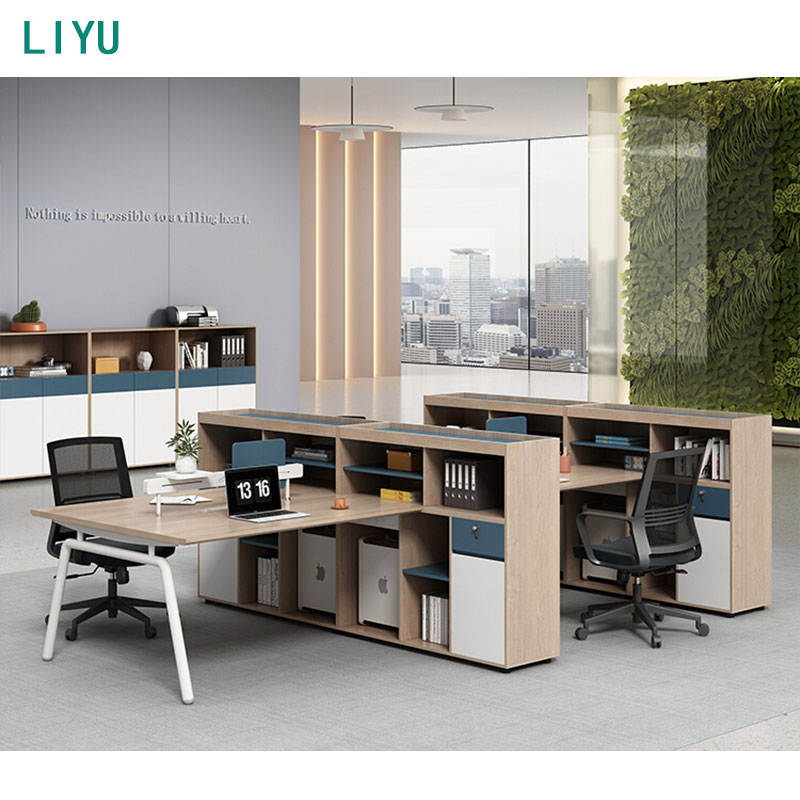
Evaluate straight base sit-stand desk systems for structural stability. You must test the desk at its maximum height. Cheaper frames wobble significantly during heavy typing. This creates visual fatigue as your monitors shake. Look for frames with heavy steel feet, thick lifting columns, and crossbar supports. The desk must remain rigid regardless of elevation. Pay attention to the overlap inside the lifting columns; more overlap equals less wobble at standing heights.
Assess the lift mechanisms critically. Compare pneumatic cylinders against electric dual-motor systems. Dual motors provide smoother transitions and handle heavier loads effortlessly. Single motors often struggle and burn out prematurely under heavy equipment. Check the motor reliability ratings. Memory presets are mandatory for daily efficiency. They allow you to switch between sitting and standing postures with a single touch. Verify the maximum weight capacity includes the weight of the desktop itself.
Lift Mechanism Type | Weight Capacity | Stability at Max Height | Best Use Case |
|---|---|---|---|
Pneumatic Cylinder | Low (Under 50 lbs) | Moderate | Laptop-only users, mobile workstations. |
Single Motor Electric | Medium (Up to 150 lbs) | Moderate to Low | Basic setups, single monitor, light typing. |
Dual Motor Electric | High (250+ lbs) | High | Multi-monitor setups, heavy CPU towers, full-time use. |
Analyze the utility of two-tier layouts for compact spaces. Use the bottom tier for your active workspace and keyboard. Use the top tier for monitor elevation and passive storage. This maximizes vertical utility without expanding the horizontal footprint. It keeps reference materials accessible but out of your immediate typing zone.
Decide between integrated and modular storage. Built-in credenzas offer massive capacity but limit future layout changes. Mobile pedestals provide flexibility. You can roll them under the desk or move them to serve as printer stands. Look for box/box/file configurations to accommodate both small supplies and hanging folders. Creating a unified aesthetic provides psychological benefits. Matching your desk with complementary bookcases and credenzas elevates the room. This is particularly important in visible, open-concept homes where the office blends into living areas.
Compare surface materials based on your daily usage. High-pressure laminate (HPL) resists scratches, spills, and impact damage. It handles heavy equipment without denting. Solid wood offers unmatched visual warmth but requires regular maintenance. Metal chassis provide the ultimate structural integrity for heavy loads. Avoid paper-thin veneers over low-density particleboard, as they peel quickly under daily friction.
Address the impact of the Texas climate. DFW experiences intense humidity and rapid temperature fluctuations. Solid wood joints expand and contract with these changes. If your home HVAC system fails during a summer heatwave, solid wood desktops can warp or crack across the grain. Engineered wood cores with HPL surfaces remain dimensionally stable regardless of indoor humidity. They offer the most reliable performance for year-round use.
Select High-Pressure Laminate (HPL) for maximum scratch and moisture resistance.
Inspect edge banding thickness; 2mm or 3mm PVC edges resist peeling and chair impacts.
Avoid solid wood slabs if your office experiences direct, intense sunlight through untreated windows.
Ensure metal frames feature a durable powder-coated finish to prevent rust in humid environments.
You gain significant structural advantages by choosing commercial office furniture for your home. These pieces undergo rigorous BIFMA certification testing. They survive heavy drop tests, cycle testing on drawers, and extreme weight load evaluations. Commercial-grade edge banding prevents peeling and chipping from chair impacts. You get a product built for continuous, eight-hour daily use, featuring 1.125-inch thick tops rather than the standard 0.5-inch residential tops.
You must weigh the trade-offs. Commercial components are heavy. They require substantial effort to move and assemble. The aesthetics lean toward industrial or corporate styles. This might clash with warm residential decor. However, many modern commercial lines now incorporate wood-grain laminates and softer profiles. The durability vastly outweighs the initial assembly challenges.
Sometimes retail options fail to meet specific spatial or functional requirements. You should partner directly with an office desk manufacturer when you need exact dimensions. Custom builds allow you to specify unique wood species or integrate complex power routing directly into the desk legs. You control every aspect of the design, ensuring the piece fits perfectly into an alcove or bay window.
Evaluate the lead times associated with custom commissions. Fabricating a specialized piece takes weeks or months. You must also account for premium fabrication costs. Commissioning a desk tailored to your exact workflow is an investment in your daily efficiency. It eliminates the compromises forced by mass-produced furniture. You get exactly what your hardware and space demand.
Provide exact room dimensions and hardware specifications to the manufacturer.
Request integrated wire management channels routed through the desk frame.
Review physical material samples in your home lighting before finalizing the order.
Confirm delivery and white-glove installation terms for custom pieces.
Perform a strict cost-benefit analysis before sourcing used commercial desks. Local Dallas liquidators often stock high-quality, refurbished workstations. You can acquire premium brands for a fraction of their original retail price. This allows you to access commercial durability on a tighter budget. However, you must navigate revolving inventory. High-quality used stock sells out rapidly. You need strategies for acting quickly when the right piece appears.
Use a rigorous inspection checklist when evaluating used inventory. Check for motor wear in used standing desks. Listen for grinding noises or uneven lifting. Inspect the laminate surfaces for deep scratches or edge peeling. Verify that all proprietary hardware, such as specific bracket screws or cable trays, is present. Missing proprietary parts can render a used desk impossible to assemble.
Test the full range of motion on any used sit-stand mechanism multiple times to check for thermal overload.
Inspect drawer glides for smooth operation and full extension without catching.
Check the underside of the desktop for stripped screw holes from previous installations.
Verify the structural integrity of the modesty panels and crossbars.
Ask the liquidator if they provide a short-term warranty on electronic components.
Different professions demand entirely different functional layouts. You cannot force a single desk style to serve every workflow. Below is a breakdown of how specific features map to professional outcomes.
Professional Role | Primary Workflow Demands | Required Desk Features | Recommended Configuration |
|---|---|---|---|
Tech Professional / Data Analyst | Multiple large monitors, heavy CPU towers, extensive cable routing. | 30+ inch surface depth, heavy-duty grommets, under-desk cable trays, dual-motor lift. | Deep rectangular sit-stand desk with heavy steel chassis. |
Executive Leader | Client video calls, document review, commanding aesthetic presence. | Premium veneers, integrated modesty panels, concealed power hubs, expansive surface. | Custom executive desk with matching credenza. |
Creative Freelancer | Digital design mixed with analog sketching or physical material review. | Distinct spatial zones, durable surface for drafting, modular storage access. | L-shaped or U-shaped workstation with return. |
Minimalist / Low-Tech User | Laptop-only work, basic note-taking, high aesthetic integration. | Compact footprint, minimal visual bulk, integrated shallow drawers. | Classic writing desk or slim profile mid-century modern frame. |
Tech professionals require deep surfaces. A minimum depth of 30 inches provides the necessary focal depth for dual 27-inch or 32-inch monitors. Shallow desks cause eye strain. You need heavy-duty monitor arm grommets to support clamp mounts without crushing the desktop core. Under-desk cable management trays are critical. They keep power strips and thick data cables off the floor, preventing accidental unplugging and maintaining a clean aesthetic.
Leaders require a workspace that projects authority during video conferences. A custom executive desk delivers commanding aesthetics. Look for Italian-made veneers or solid wood construction. Integrated modesty panels hide cables and provide a clean look from the front. Concealed power hubs allow you to plug in devices without reaching under the desk. This configuration is essential for client-facing home offices where first impressions matter.
Creatives constantly shift between digital and physical mediums. Modern L-shaped or U-shaped configurations provide the necessary separation. You can dedicate one side entirely to your monitors and digital tablets. The return side remains clear for analog sketching, reviewing blueprints, or organizing physical samples. This spatial division prevents clutter from encroaching on your active digital workspace.
If you work exclusively from a laptop, you do not need a massive commercial chassis. Classic writing desks offer compact footprints. They integrate seamlessly into living rooms or bedrooms without causing spatial disruption. You prioritize aesthetic integration over heavy-duty hardware support. Look for desks with slim profiles and hidden shallow drawers for basic office supplies. Keep the visual weight of the furniture light.
Purchasing oversized, pre-assembled commercial desks introduces significant logistical risks. A fully welded steel frame or a massive executive credenza might not clear standard residential doorways. Older homes in Dallas often have narrow hallways or tight stairwell turns. High-rise apartments require freight elevator access and a Certificate of Insurance (COI) for delivery teams. If the desk does not fit, you face expensive return shipping fees.
Mitigate these risks through precise measurement and planning. Verify flat-pack delivery options before purchasing. Flat-pack furniture navigates tight corners easily. Measure your elevator clearances, doorway widths, and hallway angles. Do not guess these dimensions. Utilize white-glove installation services for heavy or complex systems. Professional installers handle the heavy lifting and ensure motors are calibrated correctly.
Measure the diagonal clearance of all doorways along the delivery path.
Book freight elevators in advance if living in an apartment building.
Confirm whether the delivery service drops at the threshold or inside the room.
Clear the assembly area of all existing furniture before the delivery team arrives.
You risk voiding warranties by self-modifying desks. Drilling custom grommet holes or attaching third-party keyboard trays can void surface guarantees. Improperly mounting heavy CPU holders might void frame warranties if the screws penetrate too deeply. You must understand the limitations of your coverage before making any structural changes to the furniture.
Review manufacturer warranty terms meticulously. Differentiate between motor warranties and surface wear warranties. A ten-year frame warranty means little if the electronic control box only carries a one-year guarantee. Prioritize brands with local DFW service networks. If a dual-motor system fails, you need a technician who can dispatch replacement parts quickly, rather than waiting weeks for international shipping.
Read the fine print regarding weight limit exclusions on sit-stand frames.
Keep all original assembly manuals and digital receipts accessible.
Register the product immediately upon delivery to activate the warranty.
Use clamp-on accessories instead of drill-mounted options to preserve the desktop.
Audit your current hardware weight and dimensions to establish a strict baseline for load capacity.
Measure your available floor space accurately, ensuring you account for chair clearance, door swings, and baseboards.
Test various sit-stand mechanisms at local commercial showrooms to feel the difference between single and dual-motor stability.
Filter your final options based on material durability, prioritizing HPL for heavy use, and check the length of the electronic warranty.
Finalize your layout plan to include cohesive storage solutions that match your workflow demands and keep cables off the floor.
A: Budget-friendly used commercial desks typically fall into lower pricing tiers. New commercial-grade sit-stand systems occupy the mid-to-high tiers. Premium custom builds, featuring exotic woods and integrated power, represent the highest investment tier. Your final cost depends entirely on motor quality, surface materials, and customization levels.
A: Yes. Commercial BIFMA-rated furniture undergoes rigorous durability testing that standard retail options skip. You benefit from superior load-bearing capacities, thicker edge banding, and extended warranties. This ensures the desk withstands continuous daily use without sagging or peeling over time.
A: You can source them by working directly with specialized office desk manufacturers or local commercial furniture dealers. These partners allow you to specify exact dimensions, select premium materials, and integrate custom power routing tailored to your specific home office layout.
A: Absolutely. They provide significant ergonomic ROI by allowing postural changes throughout the day, reducing back strain. You must invest in dual-motor systems for stability. Cheaper single-motor desks wobble and fail quickly under the weight of multiple monitors.
A: Base your choice on square footage and hardware load. Use an L-shaped desk if you need distinct zones for digital work and analog tasks, or if you have heavy equipment. Choose a classic writing desk if you are a laptop-only user in a compact space.
A: High-pressure laminates (HPL) and metal frames hold up best. They resist warping and expansion caused by fluctuating Texas humidity. Solid wood requires strict climate control and maintenance to prevent joint separation or cracking during extreme temperature shifts.


