
Views: 0 Author: Site Editor Publish Time: 2026-09-10 Origin: Site


The shift toward permanent remote and hybrid work forces professionals to integrate functional workstations into severely constrained residential square footage. Deploying a workstation in a small space often results in compromised ergonomics, cluttered living areas, or inadequate surface area for essential hardware. The challenge is identifying viable physical zones without disrupting the room's primary utility. This guide provides a technical evaluation of spatial requirements, structural constraints, and optimal placement strategies for integrating a miniature office desk into high-density environments. We break down how to audit your hardware, measure architectural zones, and select a desk type that maximizes productivity without consuming your living space.
A functional workspace requires strict adherence to ergonomic minimums. The 40-inch by 20-inch surface area rule serves as the absolute baseline for productivity. Dropping below a 20-inch depth severely compromises focal distance to monitors. A standard 27-inch monitor requires at least 20 inches of distance from the user's eyes to prevent ocular strain. Shallow desks force the screen too close, leading to fatigue and poor posture. You must maintain this depth to ensure a safe viewing angle.
Vertical clearance requirements dictate physical comfort. Standard desk height ranges between 28 and 30 inches from the floor. You must secure a minimum knee clearance of 20 to 24 inches in width. This prevents your legs from hitting drawer pedestals or support brackets. Confined spaces often tempt users to compromise on legroom to add storage. This trade-off leads to long-term physical discomfort.
Evaluating the physical footprint of the user is mandatory. The desk itself is only half of the spatial equation. You must factor in the chair push-back radius. A standard office chair requires a minimum of 36 inches of clearance behind the desk. This allows the user to stand up and push the chair back safely without hitting a wall or adjacent furniture. Failing to account for this radius renders a compact workspace unusable.
When measuring for your chair push-back radius, account for the flooring material. Hardwood floors allow casters to roll easily, meaning you might get away with exactly 36 inches. High-pile carpets create friction, often requiring users to push back further to gain leverage when standing. If you operate in a carpeted bedroom, plan for 40 inches of rear clearance. Additionally, consider the armrests. Fixed armrests that sit higher than 28 inches will not slide under a standard desk. This forces the chair further out into the room when unoccupied, eating up valuable floor space. Always specify chairs with adjustable or flip-up arms for tight environments.
Calculating the square inch requirements for modern hardware stacks prevents surface overcrowding. A standard 15-inch laptop consumes roughly 130 square inches. A full-size mechanical keyboard requires another 60 square inches. A standard monitor stand takes up about 100 square inches. On a 40x20 desk offering 800 total square inches, hardware quickly consumes half the available space. You must preserve the remaining area for analog essentials like physical notebooks and reference documents.
| Hardware Component | Average Dimensions (Inches) | Estimated Footprint (Sq. Inches) |
|---|---|---|
| 15-inch Laptop | 14 x 9.5 | 133 |
| Full-Size Keyboard | 17.5 x 5.5 | 96 |
| Standard Monitor Base | 10 x 8 | 80 |
| Mouse and Mousepad | 10 x 12 | 120 |
| Letter-Size Notepad | 8.5 x 11 | 93.5 |
The role of micro-computing drastically alters spatial planning. Devices like Windows Mini PCs and Mac Minis reduce necessary desk depth. They eliminate the need for bulky tower cases on or under the desk. Shifting to micro-computing allows you to reclaim valuable surface area. You can mount these small units directly under the desk surface or behind the monitor using VESA brackets. This keeps the primary work zone completely clear of computing hardware.
Monitor mounting strategies offer the highest spatial return on investment. Using C-clamp monitor arms reclaims 15 to 20 percent of usable surface area on a miniature desk. By removing the factory monitor base, you free up the exact space needed for a keyboard or notebook. Ensure your desk material can support the localized pressure of a C-clamp. Solid wood or thick MDF handles this well, while thin particleboard may crack under the tension. If you use a hollow-core desk, insert a steel reinforcement plate between the clamp and the desk surface to distribute the load.
Utilizing standard walk-in or reach-in closets offers excellent spatial efficiency. Most residential closets measure 24 to 30 inches deep. A 22-inch deep desk fits perfectly inside this footprint. This leaves enough room for the door to close or a curtain to hang. You must remove the lower hanging rods to clear vertical space. This strategy isolates the workspace from the primary living area entirely, providing a dedicated zone for focused work.
Executing a closet conversion requires specific structural modifications. First, patch and paint the walls with a light, reflective color to combat the enclosed feeling. Next, locate the wall studs. Closets often have irregular stud spacing at the corners. Use a magnetic stud finder to mark your anchor points before installing any floating shelves or desk surfaces. If you plan to run power into the closet, hire an electrician to install a dedicated outlet. Running extension cords under closet doors creates tripping hazards and violates fire codes.
Acoustic and lighting considerations require immediate attention in a closet. Closets lack natural light and trap sound. Replace bulky desk lamps with space-saving monitor light bars. These bars illuminate the desk surface without consuming physical space. Install under-shelf LED strips to brighten dark, enclosed architectural corners. Add foam acoustic panels to the back wall to dampen echo during video calls. Hard drywall surfaces in a small, enclosed box will bounce sound waves aggressively, making your microphone audio sound hollow.
Vertical optimization maximizes the utility of the closet. Install modular shelving above the desk plane. Use this space for peripheral storage, books, and office supplies. Keep the primary desk surface clear. Utilize simple curtains or sliding barn doors to conceal the workspace after hours. This physical separation helps maintain work-life boundaries in small apartments.
Leveraging L-shaped or triangular compact desks utilizes dead space effectively. Corners in living rooms or bedrooms often sit empty. A triangular desk fits perfectly into a 90-degree corner, offering deep monitor placement while keeping the front edge narrow. This shape prevents the desk from protruding into the center of the room. When measuring for a corner desk, check the squareness of your walls. Many residential corners are not perfectly 90 degrees. You may need to leave a small gap at the back to accommodate uneven drywall.
Flush-wall placement dynamics support varied room layouts. Positioning a compact office desk directly against a wall maximizes central room flow. Floating a desk in the middle of a small room disrupts movement and makes the space feel cramped. Pushing the desk flush against a wall opens up the floor plan. Ensure the desk features inset back legs to clear residential baseboards. If the legs sit flush with the back edge, the desk will sit an inch away from the wall, creating an annoying gap where pens and cables can fall.
Traffic flow analysis prevents functional bottlenecks. Ensure corner and wall placements do not obstruct primary room walkways. Map out the standard walking paths from doors to beds or sofas. Verify that the chair push-back radius does not intersect with these paths. Check all door swings carefully. A desk placed too close to an inward-swinging door creates a severe spatial conflict. You can test this by placing a cardboard box of similar dimensions in the proposed spot and walking around it for a few days.
Strategies for blending a workspace into a living area require visual discipline. The desk should not dominate the visual aesthetic of the room. Match the desk materials to the existing furniture. If your living room features walnut wood tones, select a desk with a similar finish. Avoid industrial metal desks in soft, traditional bedrooms. The goal is visual harmony. A well-executed office desk layout integrates seamlessly into the existing decor rather than fighting it.
Using physical delineators separates the workstation from relaxation zones. Place a distinct area rug under the desk and chair. This creates a psychological boundary between work and rest. Install slatted wood room dividers to block the line of sight from the bed to the desk. You can also use tall, narrow bookshelves to create a makeshift wall. These subtle physical cues organize the room's utility without requiring permanent construction.
| Desk Type | Spatial Footprint | Installation Requirement | Best Use Case |
|---|---|---|---|
| Wall-Mounted / Floating | Zero floor space | Wall studs, heavy anchors | Tight corridors, narrow alcoves |
| Fold-Down / Murphy | Zero when closed | Wall studs, hinges | Guest rooms, dual-purpose spaces |
| Scaled Executive Desk | Fixed, moderate footprint | Freestanding | Dedicated home offices, open plans |
Wall-mounted desks attach directly to wall studs with no vertical legs. This mechanism relies entirely on heavy-duty steel brackets hidden beneath the surface. The primary advantage is a zero floor footprint. This allows for unobstructed storage or maximum legroom underneath. The highly minimalist design makes it ideal for tight corridors or narrow alcoves where traditional desk legs would cause tripping hazards.
This design introduces strict weight limitations. Standard drywall anchors cannot support the dynamic weight of a user leaning on the desk. You must mount the brackets directly into wooden or metal wall studs. This requires structural evaluation of the wall. Use a 3-inch wood screw to secure the brackets into the center of the stud. If you have metal studs, you must use toggle bolts designed for heavy shear loads. Installation is permanent and leaves significant holes in the drywall. You cannot easily move this setup to another room without patching and painting.
Consider the depth limitations of floating desks. Because they lack front support legs, extending the depth beyond 20 inches creates a massive lever effect. The further out the desk extends, the more stress it places on the wall anchors. Stick to shallow depths for floating setups to maintain structural integrity.
Fold-down desks utilize hinged surfaces that retract flat against the wall when not in use. This mechanism reclaims 100 percent of the spatial footprint post-workday. It is the ideal solution for dual-purpose rooms, such as guest bedrooms or studio apartments. When closed, the unit often resembles a shallow cabinet or a piece of wall art. Some models include a chalkboard or corkboard on the underside, adding utility when folded away.
The primary risk involves daily setup and teardown friction. You must clear the entire desk surface before folding it away. This requires mobile hardware storage for your laptop, keyboard, and mouse. You cannot use a heavy desktop monitor with a standard fold-down desk unless it mounts directly to the wall behind the folding mechanism. Additionally, the moving hinges and latches are subject to mechanical wear over time. Frequent use requires regular maintenance of the hardware. Lubricate the hinges annually and check the locking latches for metal fatigue.
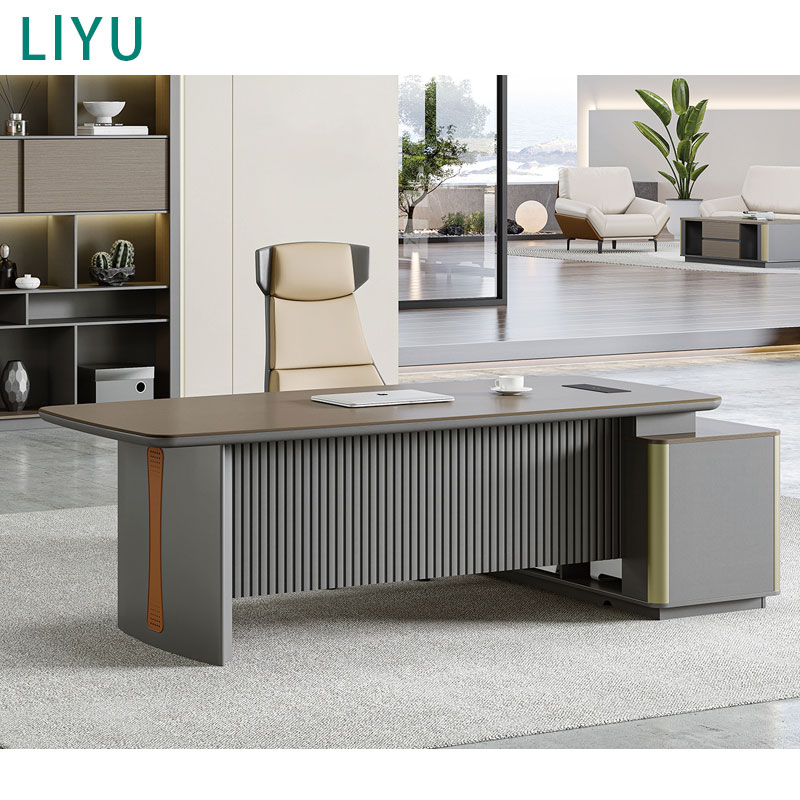
Freestanding desks that mimic premium materials offer a different approach. A modern executive desk features a closed-back design and projects authority. Scaled-down versions reduce the footprint to dimensions like 45 by 24 inches. They often include integrated, concealed storage drawers. This design projects professionalism for video calls and hides cable clutter behind the modesty panel. The solid construction dampens typing noise and provides a highly stable surface for heavy monitor setups.
These desks carry the heaviest visual and physical footprint. They are difficult to place in narrow corridors or closets. The closed-back design blocks legroom if pushed against a wall. They typically require a room-facing layout. This means the desk sits in the room, facing the door. This setup demands more central floor space than flush-wall or floating alternatives. You must ensure you have at least 36 inches of clearance behind the desk and another 36 inches in front of it for guest seating or general room navigation.
An inherent conflict exists between adding under-desk drawer pedestals and maintaining ergonomic knee space. In a compact setup, every inch of under-desk storage subtracts directly from your legroom. If you install a 15-inch wide drawer unit under a 40-inch desk, you leave only 25 inches for your legs. This forces an asymmetrical seating position, leading to back pain and hip misalignment. You must prioritize legroom over integrated storage. Never compromise your physical posture to store a few extra pens.
Micro-organization tactics solve this deficit. Install a small, dedicated wall shelf solely for daily work essentials. Keep pens, paperclips, and sticky notes on this shelf. This keeps the primary work surface entirely clear. Do not store non-essential items on the desk. Shift long-term storage to vertical wall units or floating shelves mounted high above the monitor line.
Use mobile filing cabinets that serve as secondary seating. A low-profile rolling cabinet with a cushioned top can sit outside the desk footprint. You can roll it under the desk only when the workspace is not in use. This provides storage without permanently compromising your daily ergonomic clearance. Ensure the casters on the cabinet lock securely so it does not roll away when used as a seat.
Unmanaged cables create severe visual and physical hazards in a miniature setup. A small desk amplifies the clutter of power cords, display cables, and peripheral wires. Cables dangling behind a floating desk ruin the minimalist aesthetic. Cables pooling on the floor create tripping hazards in tight spaces. You must implement strict routing solutions to maintain a clean, functional zone.
Deploy power strip concealment boxes on the floor to hide bulky power adapters if under-desk mounting is not possible. Keep all cables taut and off the ground. Loose cables will inevitably get caught in your chair casters, ripping ports out of your hardware.
Placing heat-generating hardware in unventilated spaces poses severe risks. Laptops, power bricks, and Mini PCs generate significant thermal output. Operating these devices inside a closed closet or a tight wall corner traps the heat. This leads to thermal throttling, reduced hardware performance, and potential hardware failure. You must manage airflow proactively, especially in closet conversions.
Ensure a minimum 2-inch clearance between hardware exhausts and adjacent walls. Never push a laptop exhaust vent flush against a wall panel. If you operate inside a closet, leave the door cracked during heavy computing tasks. Consider adding a small, low-noise USB fan to circulate air away from the hardware stack. Passive ventilation requires open space; active ventilation requires fans. If you mount a Mini PC under the desk, ensure the mounting bracket does not block the intake vents.
Inventory all mandatory daily-use equipment before selecting a desk. Measure the exact footprint of your laptop, monitor base, keyboard, and mousepad. Calculate the total square inches required. If your workflow requires dual 27-inch monitors and a full-size mechanical keyboard, a fold-down desk is disqualified. You must match the desk capacity to your hardware reality. Do not buy a desk and hope the hardware fits later. Write down the exact dimensions of your gear and compare it to the usable surface area of the desk.
Map out all potential zones in your home. Evaluate closets, empty corners, and flush walls. Use a tape measure to record the exact width and depth of the alcove. Factor in baseboards and door trims, as they reduce usable width. Measure the required 36-inch chair clearance. Mark the floor with painter's tape to visualize the exact footprint of the desk and chair before making a purchase. This physical mock-up reveals spatial conflicts that numbers on a page hide.
Determine the required permanence of the workstation. If the desk needs to disappear after hours to reclaim the room's primary function, favor a fold-down desk or a curtained closet conversion. If the desk serves as a permanent, professional fixture in an open-plan space, favor a freestanding scaled executive desk. Match the desk type to the daily operational rhythm of the household. A desk in a high-traffic hallway must have rounded corners to prevent injuries, while a desk in a dedicated nook can feature sharp, modern angles.
A: A minimum depth of 20 inches is required. This safely accommodates a laptop or monitor stand while maintaining an ergonomic viewing distance. It also leaves enough room for a keyboard and analog tasks like a physical notebook.
A: Yes, scaled-down versions of executive desks exist. They reduce the overall footprint to roughly 45 by 24 inches while maintaining the premium materials, closed-back design, and integrated storage of larger models.
A: You need a minimum of 36 inches of clearance behind the desk. This push-back radius allows you to stand up and move the chair safely without hitting walls or other furniture.
A: Floating desks are safe only if mounted directly into wooden or metal wall studs using heavy-duty brackets. Standard drywall anchors cannot support the weight of heavy monitors and the dynamic pressure of a user leaning on the desk.
A: Install under-desk raceways to route thick power cables. Use adhesive zip-tie mounts to secure peripheral wires to the underside of the surface. Place a concealment box on the floor to hide bulky power strips and adapters.
A: Yes. Most standard walk-in and reach-in closets are 24 to 30 inches deep. A 22-inch deep desk fits perfectly. You will need to remove lower hanging rods and add dedicated lighting to make the space functional.


