
Views: 0 Author: Site Editor Publish Time: 2026-09-05 Origin: Site


The traditional executive workspace is shifting from a single, massive desk to a modular, multi-surface environment designed to separate active tasks from archival storage. Executives and professionals struggle to maintain a clean, authoritative primary workspace while managing the physical footprint of technology, secure documents, and reference materials. Piles of client folders and tangled charging cables quickly diminish the professional impact of a premium office suite. Integrating a credenza into an executive suite resolves this tension by providing a dedicated secondary zone. It acts as a structural anchor handling the heavy lifting of organization. This allows the main desk to remain clear for high-level decision-making and face-to-face meetings. This guide evaluates the functional, spatial, and ergonomic criteria for determining if a credenza is the correct storage and workflow solution for a specific office layout.
To optimize an executive layout, you must first understand the structural taxonomy of office storage. Buyers frequently confuse sideboards, buffets, and credenzas due to their similar horizontal profiles. Their internal engineering and intended environments differ drastically. Sideboards and buffets are residential pieces built for dining rooms. They feature shallow drawers for silverware and tall cabinets for serving dishes. In contrast, a credenza office desk features a signature long and narrow profile specifically engineered for the workplace. This design maximizes horizontal storage and surface area without encroaching on the primary desk's footprint. You get a massive secondary work zone that sits flush against a wall or acts as a freestanding divider.
Commercial-grade specifications distinguish a true office credenza from residential counterparts. Office environments demand heavy-duty performance. A professional credenza includes reinforced tops, typically 1-inch to 1.5-inch thick thermally fused laminate (TFL) or high-pressure wood veneer. Commercial units utilize high-density medium-density fiberboard (MDF) cores to prevent sagging under heavy loads. They also feature adjustable steel leveling glides on the base to ensure the unit sits perfectly flat on uneven commercial carpets or concrete floors. These tops support heavy hardware like multi-tray laser printers, dual-monitor arrays, or heavy binding machines without bowing. The internal framework incorporates integrated lateral filing systems. These drawers use heavy-duty, full-extension ball-bearing slides rated for 100 to 150 pounds, designed to hold letter and legal-sized documents securely. Furthermore, commercial credenzas feature wire management grommets, usually 60mm or 80mm in diameter, and concealed cable channels. These elements prevent power cords from spilling over the edges.
The modern workplace has seen a massive shift toward multi-surface setups. The traditional double-pedestal desk forces users to keep all their tools in one confined area. The desk-and-credenza pairing breaks this limitation. This layout supports hybrid workflows requiring both digital and analog workspaces. You can draft a proposal on your primary computer monitor while keeping physical reference blueprints spread out on the credenza behind you. This separation of tasks reduces cognitive load and physical clutter.
Defining success for this implementation relies on strict visual and functional criteria. A successful credenza integration results in zero visible cables on the primary desk. It ensures all essential files remain within arm's reach without requiring you to stand up. Finally, it demands cohesive material matching. The wood veneer or laminate of the credenza must perfectly align with the primary desk to project a unified, intentional design.
A credenza operates primarily as a supplemental workspace and a centralized technology hub. Executives rely on a multitude of devices that require constant power and connectivity. Placing secondary monitors, heavy-duty printers, routers, and secure charging stations on the primary desk creates visual chaos. The credenza absorbs this technological footprint. By utilizing built-in power modules and rear-facing cable routing, the credenza keeps essential technology accessible yet out of the direct line of sight during client consultations. You can route heavy power cables through the back panel directly into wall outlets, keeping the floor clear of trip hazards. Advanced units incorporate J-channels and flexible snake organizers to manage cable slack effectively.
When evaluating advanced organization, the credenza offers significant advantages over a standard wooden file cabinet. Traditional standalone cabinets excel at vertical storage but fail to provide usable work surfaces. A credenza combines lateral filing, concealed shelving, and display space within a single horizontal footprint. This multi-functional approach means you do not sacrifice floor space for a unit that only serves one purpose. The lateral drawers in a credenza allow for side-to-side filing, but many also include adjustable crossbars for front-to-back letter filing. Commercial units feature factory-installed counterweights in the rear panel to prevent the unit from tipping forward when a fully loaded drawer is extended. This makes scanning and retrieving documents faster and more ergonomic than digging through deep vertical drawers. Many units also include adjustable internal shelving behind solid doors, perfect for storing oversized binders, software boxes, or personal items.
Beyond utility, credenzas serve as stylish focal points within an executive office. Their sleek, elongated surfaces provide an ideal platform for displaying art, industry awards, and architectural models. In client-facing environments, the credenza often functions as a sturdy base for a presentation monitor or a smart TV. This setup allows executives to pivot smoothly from a casual desk conversation to a formal digital presentation without moving to a separate conference room.
Architecturally, credenzas play a vital role in spatial division and traffic flow. In open-plan executive suites or shared management spaces, a freestanding credenza acts as a physical barrier to direct foot traffic. It clearly defines where the public circulation path ends and the private workspace begins. In glass-walled environments, a strategically placed credenza acts as a subtle privacy screen. It shields sensitive documents from passersby while maintaining the open, transparent feel of the office architecture.
| Storage Type | Primary Function | Surface Utility | Spatial Footprint | Hardware Capacity |
|---|---|---|---|---|
| Office Credenza | Lateral filing, tech housing, display | High (Wide, continuous workspace) | Horizontal (Requires wall space or rear clearance) | Supports heavy printers, dual monitors, TVs |
| Vertical File Cabinet | High-density document archiving | Low (Small top surface, often too high) | Vertical (Compact floor footprint) | Minimal (Top surface only supports light items) |
| Bookshelf / Hutch | Reference materials, binders, decor | None (Strictly storage) | Vertical (Mounts on credenza or wall) | None (Shelves designed for static weight) |
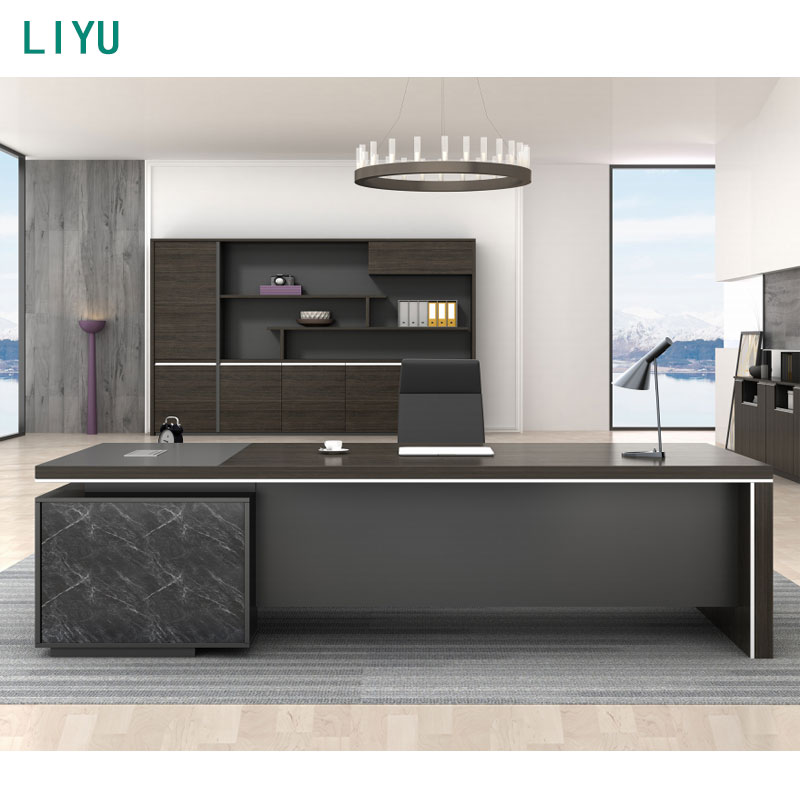
The freestanding parallel layout remains the classic standard for executive suites. In this configuration, the credenza sits directly behind the primary desk, separated by a dedicated seating corridor. This setup maximizes the ergonomic benefits of the 180-degree swivel workflow. You transition from typing an email at your main desk to signing a physical contract on the credenza simply by rotating your chair. This layout keeps the two furniture pieces structurally independent. You can easily upgrade or replace one without dismantling the entire office. It also allows facilities teams to access wall outlets and data ports easily.
For professionals requiring massive amounts of continuous surface area, an L-shape or U-shape executive desk with storage offers a highly integrated alternative. In these modular systems, the credenza connects directly to the primary desk via a bridge component. This creates a continuous, wraparound workstation. The primary advantage is the sheer volume of active workspace available without ever leaving the chair. You can slide documents across the surface without picking them up. However, this configuration introduces strict trade-offs. A connected U-shape creates a locked, inflexible footprint. It dictates exactly where the desk must sit in the room and makes future reconfigurations difficult and labor-intensive. The bridge component also blocks floor access, meaning you cannot easily walk behind the desk from both sides.
Vertical integration allows you to maximize storage without consuming additional floor space. Pairing a credenza base with an overhead hutch creates a comprehensive storage wall. Alternatively, integrating an office desk with bookshelf component directly into the credenza setup provides immediate access to heavy reference binders and industry literature. When implementing vertical storage, structural integrity is paramount. You must safely anchor the hutch or bookshelf to the credenza base using heavy-duty steel mending plates or brackets. Failing to secure these components creates a severe top-heavy hazard, especially when loading upper shelves with dense paper materials. Many commercial units include anti-tip interlock systems that prevent multiple heavy drawers from opening simultaneously, further stabilizing the vertical setup.
Implementing a credenza requires precise spatial planning. Assessing your square footage and clearances is the first mandatory step. A functional parallel layout requires a minimum of 42 to 48 inches of clearance between the back edge of the primary desk and the front face of the credenza. This specific dimension accommodates the turn-and-reach radius. If the gap is too narrow, your chair will constantly strike the furniture, damaging the edge banding. You will also lack the physical space to fully extend the lateral file drawers. If the gap exceeds 60 inches, the ergonomic advantage vanishes. You will have to stand and walk to retrieve items, defeating the purpose of the swivel workflow.
To accurately map your space, follow this measurement protocol:
Conducting a thorough workflow analysis dictates the type of storage you actually need. Audit your active versus archival storage habits. Active storage includes items you touch daily: current project files, office supplies, and charging cables. Archival storage involves tax records, closed client files, and historical data. A credenza excels at active storage and moderate archival filing. If your workflow requires deep, high-density archival storage spanning multiple years, a credenza will quickly reach capacity. In such cases, supplement the credenza with dedicated vertical filing systems located outside the immediate active work zone.
The aesthetic and authoritative impact of your furniture choices directly influences client perception. An executive office serves as a physical representation of professional competence. Matching a credenza to the primary desk in material, edge detailing, and hardware finishes projects organization, stability, and meticulous attention to detail. A mismatched room filled with disparate storage units signals chaos and a lack of permanence. Investing in a cohesive suite communicates that you are established, organized, and prepared to handle complex client needs.
While credenzas offer immense utility, they introduce specific implementation risks. The most prominent issue is the conflict between footprint and agility. Commercial credenzas are heavy, static pieces of furniture. A fully assembled 72-inch wood veneer credenza can weigh over 250 pounds empty. Once loaded with files and hardware, moving it requires a professional facilities team. You risk installing a credenza in an office that may require frequent layout reconfigurations. If your company frequently shifts floor plans to accommodate changing team sizes, a massive wooden credenza becomes a logistical liability.
Ergonomic hazards present another significant risk, particularly regarding secondary work surfaces. The standard height for an office credenza is typically 29 to 30 inches, which aligns with standard desk heights. Using a 30-inch surface as a primary typing station for prolonged periods causes shoulder strain and wrist compression. If you plan to use a computer on the credenza, you must integrate proper ergonomic accessories. This requires installing an articulating under-mount keyboard tray to drop the typing height to 27 inches. You must also utilize adjustable monitor arms to elevate the screens to eye level, preventing neck strain.
Finally, analyze the financial trade-offs. Purchasing a comprehensive executive suite that includes a primary desk, bridge, and credenza requires a larger upfront capital expenditure than piecing together disparate storage solutions over time. The piecemeal approach often results in duplicated efforts, wasted space, and a disjointed aesthetic. The strategic investment in a unified credenza setup pays dividends in daily efficiency, reduced clutter, and the professional authority projected to visiting clients and stakeholders.
A credenza functions as a strategic workflow tool that protects the primary desk from clutter, houses essential technology, and serves as a visual anchor for the room. By delegating secondary tasks and physical files to the credenza, you preserve your main workspace for critical thinking and client engagement. To finalize your executive office layout, execute the following next steps:
A: A sideboard and a buffet are residential furniture pieces designed for dining rooms, featuring shallow drawers for cutlery and tall cabinets for serving dishes. An office credenza is engineered for commercial use. It features a long, narrow profile, integrated lateral file drawers for documents, cable management grommets, and reinforced tops to support heavy office technology.
A: The standard height of a commercial office credenza is typically 29 to 30 inches. This matches the height of a standard executive desk, creating a uniform visual line across the workspace and allowing for a smooth transition when moving materials between the two surfaces.
A: Yes, it can function as a TV stand or presentation base during client meetings. However, using it as a primary computer desk requires ergonomic adjustments. Because the 30-inch height is generally too high for prolonged typing, you must install an under-mount keyboard tray and adjustable monitor arms to prevent strain.
A: A standard file cabinet focuses entirely on vertical, high-density document storage and offers minimal usable surface area. A credenza provides horizontal storage, combining lateral file drawers with a wide, continuous top surface that functions as an active secondary workspace and technology hub.
A: You need a minimum of 36 inches, but 42 to 48 inches is optimal. This clearance ensures you have enough room to comfortably swivel your chair, recline slightly, and fully extend the lateral file drawers without the chair striking the furniture.
A: Not necessarily. While an executive desk with built-in pedestals provides immediate storage for small supplies and active files, it rarely offers enough space for heavy hardware, secondary monitors, or extensive lateral filing. A credenza absorbs the overflow that would otherwise clutter the main desk.
A: Yes, but it requires strict safety protocols. You must use commercial-grade steel brackets to anchor the hutch directly to the credenza base. This prevents the unit from becoming top-heavy and tipping over when the upper shelves are loaded with heavy books or binders.


