
Views: 0 Author: Site Editor Publish Time: 2026-09-14 Origin: Site


An executive office serves as a strategic command center and a non-verbal communicator of leadership style. Visible clutter directly undermines professional authority. Standard executive desks prioritize surface area over functional storage. This design flaw leads to disorganized workspaces, compromised ergonomics, and poor cable management during high-stakes meetings or video calls. Integrating a purpose-built office desk credenza bridges the gap between aesthetic design and operational necessity. It provides concealed storage, technology integration, and secondary work surfaces without expanding the primary desk footprint. You gain immediate access to critical files and hardware while maintaining a pristine forward-facing environment. Proper layout planning transforms a chaotic room into a highly efficient workspace. By strategically positioning secondary storage, leaders can streamline their daily workflow and project absolute competence to visiting clients.
Analyze the daily operational requirements of the executive space. You must distinguish between deep-focus work, confidential document review, and client-facing meetings. Deep-focus work requires intense concentration and immediate access to reference materials, blueprints, or legal folios. Confidential document review demands privacy and secure handling of sensitive files. Client-facing meetings require an open, welcoming environment free from visual distractions. The physical layout must support all three modes seamlessly. Leaders need to transition between these tasks without physically relocating to different rooms. A well-planned storage strategy anchors this operational flexibility.
Understand how the physical workspace speaks to clients and stakeholders. A well-organized room projects competence and control. A cluttered desk signals chaos and poor time management. Leaders communicate their standards through their environment. When guests enter an executive suite, they immediately assess the atmosphere. Piles of paperwork or tangled cords erode trust. Clean surfaces and intentional furniture placement reinforce authority. The physical environment acts as a direct extension of the executive brand. Every piece of furniture must serve a distinct functional and aesthetic purpose.
Relying solely on an executive desk with storage often results in compromised legroom and poor ergonomics. Built-in pedestals restrict lateral movement. Users find themselves knocking their knees against hard wooden panels when shifting between monitors. Filing depth remains inadequate for extensive archives, as standard desk drawers rarely accommodate oversized binders or specialized equipment. Poor hardware ventilation causes equipment to overheat. Storing a computer tower, UPS battery backup, or heavy-duty printer inside a standard desk pedestal traps exhaust heat. This leads to thermal throttling, hardware failure, and shortened equipment lifespans.
To evaluate potential furniture additions, you must establish strict operational standards. Form must always follow function in high-stakes commercial environments. Apply the following success criteria when planning your workspace upgrade:
Evaluate the credenza as a visual anchor behind the executive chair. This configuration utilizes the surface for strategic display while hiding operational clutter from guest view. It provides a highly professional background for video calls. When positioned parallel to the main desk, the credenza creates a defined command zone. Executives can display family photos, industry awards, or architectural models on the top surface. The lower cabinets conceal messy active projects. This dual-purpose approach maximizes utility while maintaining a pristine forward-facing aesthetic.
Define the mandatory spatial tolerances for chair roll-back zones. You need a minimum of 36 to 42 inches between the desk and the credenza. This ensures safe and comfortable movement. It allows users to stand, stretch, and access drawers without hitting the desk edge. Skimping on this clearance results in a claustrophobic workspace. Users will constantly bump their chairs into the credenza doors, damaging the veneer over time. Measure the exact footprint of the executive chair, including its full recline radius. Factor this measurement into your floor plan before finalizing furniture placement.
Assess the biomechanical advantages of a 90-degree or 180-degree pivot. Executives transition from computer work to document review effortlessly. This maintains correct sitting posture and significantly reduces spinal strain over long hours. An L-shape configuration places the credenza at a right angle to the primary desk, creating a distinct secondary work zone. A U-shape formation surrounds the user, offering maximum surface area. Both layouts encourage healthy movement. They prevent the static postures that lead to chronic back pain in office environments.
Compare the floor space requirements of a detached credenza versus a physically connected return. A detached credenza requires more total room depth but offers greater layout flexibility for future reconfigurations. A physically connected return saves space and creates a continuous, unbroken work surface. However, connected units limit your ability to adapt the room layout later. Choose based on room dimensions and workflow preferences. Smaller offices generally benefit from connected returns. Larger executive suites can accommodate the visual breathing room of a detached setup.
Analyze how floating credenzas create an illusion of space. They expose the floor underneath, making smaller executive suites feel larger. Floor-standing models offer maximum storage capacity but carry heavier visual weight. Floating units project a modern, minimalist aesthetic and make floor cleaning significantly easier. Freestanding units provide a traditional, grounded appearance. They often feature heavier base moldings that convey permanence and authority. Your choice depends heavily on the architectural style of the building and the personal brand of the executive.
Address the wall-blocking and load-bearing requirements necessary for floating installations. Floating installations holding heavy equipment need serious structural support. Load-bearing walls are absolutely essential. Standard half-inch drywall cannot support the weight of a loaded commercial credenza. You must install 3/4-inch fire-treated plywood blocking between the steel studs before the drywall goes up. If retrofitting an existing space, you will need to open the walls to add this structural reinforcement. Toggle bolts are insufficient for commercial loads. Consult facilities management and structural engineers before selecting a wall-mounted configuration. Failure to secure the unit properly poses severe safety risks.
| Configuration Type | Minimum Clearance Required | Primary Ergonomic Benefit | Installation Complexity |
|---|---|---|---|
| Parallel (Behind Desk) | 36 - 42 inches | Encourages standing and full-body rotation | Low (Freestanding) |
| L-Shape Return | None (Connected) | 90-degree pivot reduces lumbar torsion | Medium (Requires leveling and joining) |
| U-Shape Formation | 48 inches (Internal width) | Maximum reach-zone accessibility | High (Requires precise room dimensions) |
| Wall-Mounted (Floating) | Varies by desk placement | Unobstructed foot space | Very High (Requires structural blocking) |
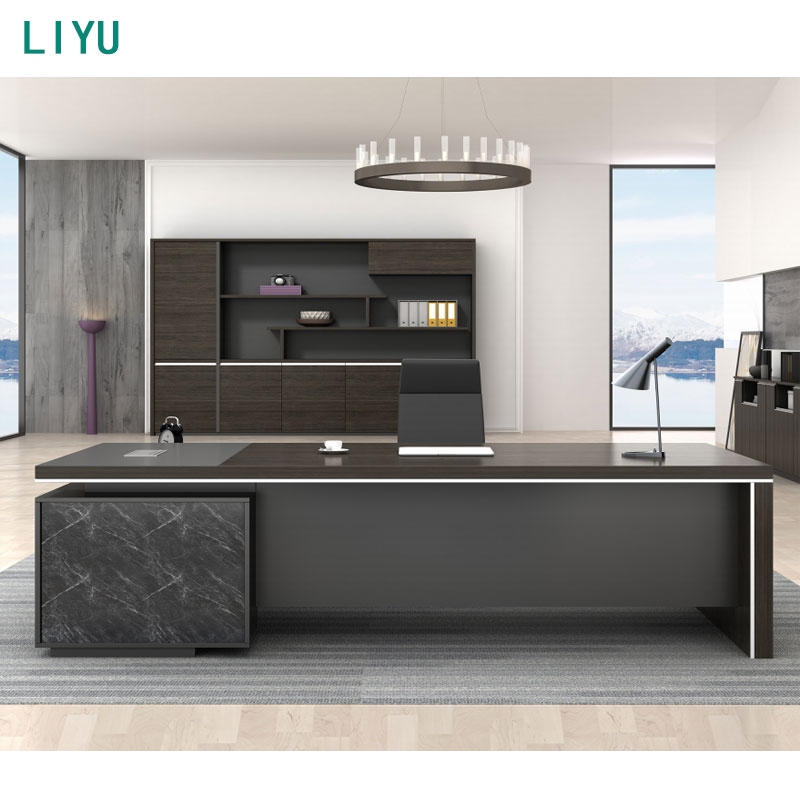
Evaluate configurations that combine closed cabinetry for hardware with open shelving. This hybrid approach effectively acts as an office desk with bookshelf. Use open sections for displaying industry awards, reference materials, or architectural samples. Keep hardware and messy active files hidden behind solid doors. Hybrid systems offer the best of both worlds. They provide necessary utility without looking like a sterile utility closet. You can customize the ratio of open to closed storage based on specific operational needs. This flexibility makes hybrid units highly desirable in modern executive suites.
Assess the durability and aesthetic value of modern cabinet hardware. Push-to-open mechanisms eliminate protruding handles, maintaining a sleek, distraction-free facade. Soft-close hinges prevent slamming noises, preserving a quiet acoustic environment. Handleless doors create a monolithic, contemporary look. However, push-to-open mechanisms require high-quality internal springs to withstand daily commercial use. Cheap hardware will fail quickly under heavy loads. Invest in commercial-grade European hinges and heavy-duty drawer glides. The tactile experience of opening and closing storage units directly impacts the perceived quality of the furniture.
Compare the spatial efficiency and aesthetic value of integrated lateral file drawers. Lateral files within a credenza maximize horizontal space. They offer a superior aesthetic alternative to a traditional, bulky wooden file cabinet. Lateral files keep documents accessible without dominating the room. They allow you to store letter and legal-sized documents side-by-side. This configuration reduces the vertical footprint of your filing system. It integrates archiving directly into the secondary work surface. The result is a cleaner, more cohesive office layout that utilizes floor space efficiently.
Evaluate the necessity of advanced locking mechanisms. Legal, financial, or HR executives handle sensitive physical data daily. Standard cam locks offer minimal protection and are easily bypassed. Gang locks secure multiple drawers simultaneously with a single key turn, providing better baseline security. Digital keypads provide keyless entry and audit trails, allowing you to track who accessed the cabinet and when. Biometric security offers the highest level of protection for confidential files. Assess the risk profile of the documents stored in the office. Match the security hardware to the required compliance standards. Do not compromise on physical data security in executive environments.
Detail the necessity of built-in grommets, raceways, and rear-access panels. These features eliminate visible wires and support concealed cable management systems. Power routing must be planned meticulously. Floor core drills bring power directly under the credenza, eliminating the need for extension cords. Integrated raceways channel cables horizontally behind the drawers. Rear modesty panels hide wall outlets and data ports. Without these pathways, cables drape over edges and pool on the floor. This creates tripping hazards and ruins the visual integrity of the workspace.
Assess the risks of enclosing servers, routers, or heavy-duty printers in unventilated cabinets. Unventilated spaces trap heat rapidly. This causes equipment failure and voids hardware warranties. Evaluate louvered doors for passive airflow. Convection cooling allows hot air to escape naturally through slotted panels. Consider active cooling add-ons for high-heat devices. USB-powered exhaust fans pull hot air out of the cabinet actively, maintaining a safe ambient temperature. Plan thermal management before installing any electronics. Proper ventilation ensures reliable technology performance during critical business operations.
Map specific features to long-term outcomes. Adjustable shelving adapts to new technology sizes. Modular pedestals accommodate changing storage needs. Flexible furniture supports evolving business requirements. When you select a credenza with modular internal components, you future-proof the workspace. A cabinet holding a printer today might need to hold server racks tomorrow. Removable shelves and adjustable mounting rails provide this adaptability. Focus on features that offer operational flexibility over the next five to ten years.
Compare the conceptual trade-offs between custom millwork and high-end modular furniture. Custom millwork offers exact spatial fits. Carpenters scribe the wood perfectly to uneven walls, creating a seamless built-in look. However, built-in millwork provides zero mobility. You cannot take it with you if the company relocates. Modular high-end credenzas offer relocation flexibility. They also come with standardized warranty support and replacement parts. If a door gets damaged, you can order a replacement easily. Custom millwork requires expensive, specialized repair work. Weigh the desire for a built-in look against the need for future flexibility.
Factor in delivery logistics, professional assembly, and potential reconfiguration requirements. Commercial-grade furniture is heavy and complex to assemble. Professional installation ensures doors align perfectly, gaps are consistent, and drawers glide smoothly. Do not rely on internal staff for assembly. Consider the ease of breakdown and transport for future office moves. High-quality modular furniture retains its structural integrity through multiple relocations. Cheaper alternatives often degrade once disassembled and reassembled, leading to stripped screws and wobbly frames.
Advance planning between internal IT teams, facilities management, and external installation partners prevents deployment delays. IT teams must route data and power before the furniture arrives. Facilities management oversees building access, freight elevator dimensions, and loading dock reservations. External installation partners require clear schedules and site readiness. Lack of coordination causes severe delays. Hold a pre-installation meeting with all stakeholders. Confirm outlet locations, data port activation, and delivery logistics. Clear communication prevents costly on-site modifications.
Ignoring baseboards, HVAC vents, and wall out-of-plumbness leads to disastrous installations. Measuring wall-to-wall distance at chest height is insufficient. Baseboards reduce the actual floor space available for a flush-fit credenza. Floor-mounted HVAC vents dictate placement limitations. You cannot block airflow with a heavy cabinet. Older buildings often have walls that are significantly out of plumb. A perfectly square credenza will leave unsightly gaps against a crooked wall. Measure meticulously at the floor, waist height, and ceiling to avoid spatial conflicts.
Transporting and installing solid wood or stone-topped credenzas presents significant logistical challenges. These materials are incredibly heavy. Older commercial buildings have strict weight limits on freight elevators. Spaces with raised access floors need load-bearing verification. Concentrated point loads from heavy furniture legs can crack floor tiles or collapse the raised floor grid. Use load distribution plates if necessary. Verify the dimensions of all doorways, hallways, and elevators along the delivery route. A credenza that fits perfectly in the office is useless if it cannot fit through the front door.
To ensure a flawless installation, follow this site survey protocol:
A: The standard height is typically 29 to 30 inches. This matches the height of most primary executive desks. Keeping the heights identical creates a continuous visual plane across the room. It also provides an ergonomic secondary work surface that supports healthy posture when reviewing documents or operating secondary keyboards.
A: You need a minimum of 36 to 42 inches of clearance between the desk and the credenza. This space ensures comfortable chair movement and full drawer extension. It allows the executive to stand, stretch, and take regular posture breaks without feeling cramped or restricted by the surrounding furniture.
A: Yes. Modern credenzas feature integrated lateral file drawers that offer equal or greater storage capacity. Lateral files provide a lower, wider, and more aesthetically pleasing profile. They integrate archiving directly into the secondary work surface, eliminating the need for tall, visually obtrusive standalone filing cabinets.
A: A desk serves as the primary, forward-facing workstation designed for active tasks and meetings. A credenza is a secondary unit, often positioned behind or to the side of the user. It is dedicated to heavy storage, hardware concealment, and displaying reference materials, keeping the main desk free of operational clutter.
A: Effective cable management requires advance planning. Use floor core drills to bring power directly underneath the unit. Utilize integrated raceways inside the credenza to route cables horizontally. Rear modesty panels and built-in grommets hide wires from view, ensuring data and power connect invisibly to concealed hardware.
A: Exact matching offers a traditional, highly formal sense of authority. However, complementary contrasting materials offer a modern, layered aesthetic. For example, pairing a rich wood desk with a matte-lacquer credenza creates visual interest. The choice depends on the specific leadership brand and the architectural style of the office.


