loading
FL-QF08A
| Availability: | |
|---|---|
| Quantity: | |


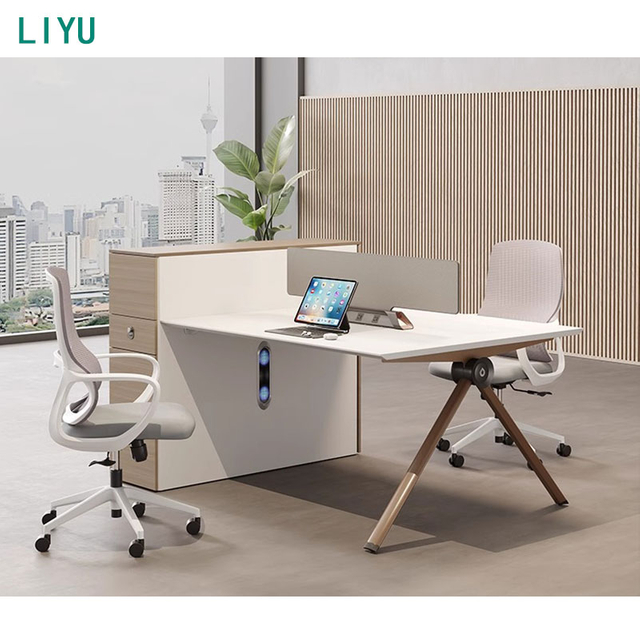
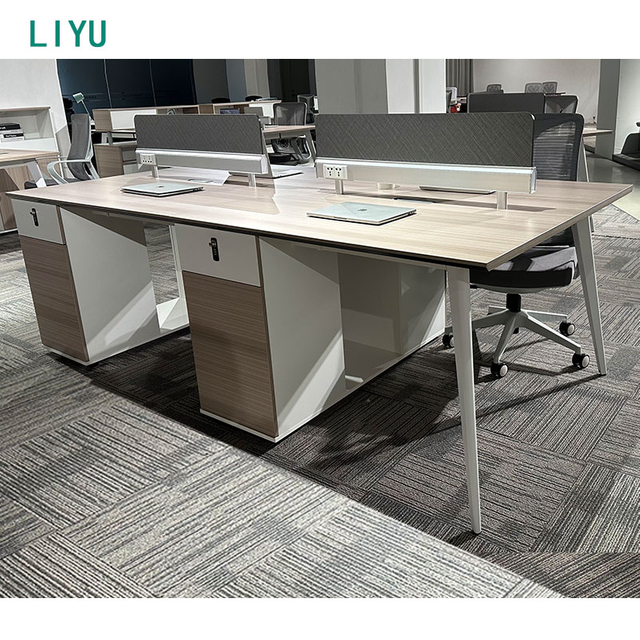
Instead of treating partitions as an afterthought, the 9mm table screen board helps define personal zones while still keeping teams visually connected. A multi-functional wire box supports safer routing up and down through the workstation, reducing the “cable drape” that tends to collect dust and snag chair wheels. For device-heavy roles, the auxiliary cabinet zoning supports daily routines, and the dual-head fan cooling detail is designed for practical heat management in demanding work environments.
| Item | Specification |
|---|---|
| Product Name | cubicle desk |
| Type | Office partition |
| Model Number | FL-QF08A |
| General Use | Commercial Furniture |
| Design | Morden Office Furniture |
| Size | custom-made |
| Color | Picture color or optional |
| Application | Hotel, Home, Apartment, School, Library, Meeting Room, Reception Room, Other |
| Service | OEM/ODM |
| Payment terms | T/T |
| Transaction mode | FOB, EXW, CIF, DDP |
| Lead time (days) | 30–45 days |
A workstation should not feel “light.” The thick desktop design creates a stable working feel for typing, writing, and multi-monitor setups, helping users stay steady and focused during high-output hours.
Built on E1-level solid wood particle board to support commercial office needs while keeping material selection responsible for indoor environments.
The surface is made to handle real-life office contact—coffee rings, pen marks, light bumps from bags—while keeping a clean, modern look. It is anti-stain, shock-resistant, wear-resistant, and includes a fire-retardant effect for added reassurance in shared spaces.
A 9mm table screen board helps create personal boundaries without cutting teams off. The multi-functional wire box supports vertical connectivity (up/down connection), helping keep power and data routing safer and tidier.
Auxiliary cabinets (single drawer cabinet and main cabinet) provide zoning for personal and shared items. A password lock supports controlled access to stored items where needed.
Self-designed mold, 1.5mm tube-shaped steel feet (no extension position) support a clean footprint and reliable support.
Brand hinges, lockers, and high-quality connecting pieces receive rust-prevention processes (acid washing, phosphating). The surface coating is designed to remain stable without peeling under typical office wear.
A cubicle desk earns its value when it makes a room feel larger, not smaller. This model supports compact planning by combining work surface, partition definition, wiring routing, and storage zoning into one cohesive workstation. For small cubicle spaces, the best layouts avoid “dead corners” and chair collisions—so plan the desk runs in clean lines or clusters, and let the screen panels define personal territory while keeping sightlines open enough for teamwork. In medium-to-large offices, cluster arrangements help teams share energy and information without forcing constant interruptions.
Keep 30–36 inches behind seating for comfortable movement and access.
Use partitions/screens to define focus zones while keeping team adjacency for fast collaboration.
Choose compact storage zoning inside the workstation so you don’t need extra cabinets that eat floor space.
When planned well, the workstation feels like it “guides” daily movement—people can sit, stand, pass, and meet without friction.
The best collaborative spaces aren’t loud; they’re organized. This cubicle desk is built to support both teamwork and personal concentration by using partitions and defined zones rather than relying on strict separation. The screen panel helps reduce visual distractions—so employees can keep their eyes on the task instead of constantly reacting to movement in their peripheral vision. At the same time, open-plan teams still need quick check-ins, shared screens, and spontaneous problem-solving. That’s why the workstation approach matters: it keeps the team close enough for easy communication, while still giving each user a clear “this is my space” boundary.
For managers and planners, this balance translates into measurable outcomes: fewer interruptions, cleaner desk culture, and smoother onboarding because every seat has a consistent setup (surface, storage, cable routing). For users, it feels calmer—less searching for space, fewer awkward cable tangles, and more control over the workday rhythm.
In real offices, cables are not a detail—they are a daily pain point. The multi-functional wire box and up/down connection approach is designed to keep wiring organized and safer. Instead of letting power strips and adapters sprawl across the floor, routing paths are built into the workstation concept so teams can maintain a cleaner footprint.
Safety: fewer loose cables reduces trip hazards and chair-wheel snags.
Maintenance: IT adjustments and desk resets take less time when cables are routed logically.
Visual order: a tidy cable path makes the entire office feel more premium and intentional.
Paired with the workstation’s practical storage zoning, teams can keep devices, accessories, and daily-use items in predictable locations. The goal is not to show off technology—it’s to keep the workplace from feeling messy, noisy, and hard to manage.
A workstation should support how people actually work: quick access, repeatable habits, and fewer micro-distractions. The auxiliary cabinets (single drawer cabinet + main cabinet) are designed around practical zoning—documents, personal items, and shared supplies each have a place. When storage is planned inside the workstation, employees stop stacking items on the desktop “temporarily,” which quickly becomes permanent clutter.
Security also matters in shared offices and hot-desking environments. The password lock supports controlled access for stored items, helping teams feel confident leaving materials in the workstation when needed. In roles where equipment runs warm, the dual-head fan cooling detail adds an extra layer of practicality for demanding work setups. The result is a workstation that stays cleaner, feels quieter, and supports a more professional desk culture—especially in open-plan environments where disorder spreads fast.
This cubicle desk is designed around one idea: the workspace should reduce friction, not add it. Every detail is meant to remove a common annoyance—sharp edges that fatigue wrists, surfaces that stain and look tired, partitions that either isolate too much or don’t help at all, cables that turn into a daily hazard, storage that feels like an afterthought. The thick desktop gives a grounded feel, while the PVC beveled edge adds comfort and a refined look. The triazine veneer supports a modern visual that stays clean under real use.
Materials and finishing choices are made to serve commercial spaces: E1-level particle board, rust-prevention treatments for hardware parts, and stable surface coating expectations. The intention is not to chase flashy add-ons; it’s to deliver a workstation that feels dependable on day one and still looks professional after months of daily routines.
Place desks side-by-side or in clusters for teams that collaborate frequently. Screen panels help define personal zones while keeping communication easy.
Consistent workstation structure supports rotating seats. Integrated wiring paths and storage zoning reduce reset time between users.
Choose compact configurations and custom sizes to fit room constraints. The clean surface and defined zone feel more “work-ready” without overwhelming the space.
Arrange in U-shaped or horseshoe layouts for guidance and interaction. A consistent desk setup supports practical training and device use.
Compact planning helps early teams grow without constantly changing furniture. Custom sizing supports tight rooms, while durable surfaces handle high usage and frequent rearrangements.
Factory-backed manufacturing: We are a factory, supporting commercial orders and project-based workstation solutions.
OEM/ODM service for project fit: Custom-made sizing and configurable options support real-world floorplans instead of forcing a “one-size” compromise.
Commercial-material mindset: E1-level panels, triazine veneer surface expectations, PVC edge processing, and rust-prevention hardware treatment details are selected for daily use and repeated cleaning.
Workstation integration: By integrating partitions, wiring support, and storage zoning, the workstation helps reduce clutter, improve focus, and keep spaces easier to manage.
Trade terms support: Available transaction modes (FOB, EXW, CIF, DDP) help procurement teams align delivery planning with project timelines and logistics preferences.
A: We are a factory, supporting commercial orders and workstation solutions.
A: Yes. Size is custom-made, and color can follow picture color or optional selections depending on your project requirements.
A: The base uses E1-level environmentally friendly solid wood particle board. The finish uses triazine decorative paper veneer that is anti-stain, shock-resistant, wear-resistant, and includes a fire-retardant effect.
A: The workstation includes a multi-functional wire box designed for up/down connection, supporting safer and tidier cable routing.
A: Auxiliary cabinets include a single drawer cabinet and a main cabinet with practical zoning, plus a password lock for controlled access.
A: Lead time is typically 30–45 days depending on style and quantity. Payment terms are commonly T/T.
A: It can be used in hotels, homes, apartments, schools, libraries, meeting rooms, reception rooms, and other commercial spaces where partitioned work areas are needed.